# Welcome

We bring the big WAVE for everyone!

Wave is the most user-friendly ecosystem designed for fast and easy earnings through innovative AI Agents, Desci, RWA, DeFAI and GameFAI applications. Dive into the Wave Ecosystem today to unlock thrilling rewards, explore innovative opportunities.

<figure><img src="https://1657324024-files.gitbook.io/~/files/v0/b/gitbook-x-prod.appspot.com/o/spaces%2FO0OuE9apMynE1w94XSMA%2Fuploads%2F6ubceeiENSfwlo6VZtqo%2Fbanner-wave-01%206.png?alt=media&amp;token=0c7db2cc-d1de-4f85-9fec-b4bea448068c" alt=""><figcaption><p>Wave - Access AI Agents, Desci, RWA, DeFAI, GameFAI on Sui through the comfort of Telegram.</p></figcaption></figure>


# About WAVE

{% hint style="info" %}
ALL Sui Ecosystem, ONE app
{% endhint %}

Wave, the aggregator of user-centric and fast-earning for Sui ecosystem and the broader Web3 realm is changing the traditional way that users interact with EOA wallets. By integrating play-to-earn games and trader-friendly dApps in one Telegram-based app, Wave is the gateway for all Web3 and Web2 users to enjoy the earning opportunities.

<figure><img src="https://1657324024-files.gitbook.io/~/files/v0/b/gitbook-x-prod.appspot.com/o/spaces%2FO0OuE9apMynE1w94XSMA%2Fuploads%2F6ubceeiENSfwlo6VZtqo%2Fbanner-wave-01%206.png?alt=media&amp;token=0c7db2cc-d1de-4f85-9fec-b4bea448068c" alt=""><figcaption><p>Wave - Access AI Agents, Desci, RWA, DeFAI, GameFAI on Sui through the comfort of Telegram.</p></figcaption></figure>


# Official Links

#### Product&#x20;

* Telegram App: <https://t.me/waveonsuibot>

#### Social Media

* Twitter: <https://twitter.com/WaveOnSui>
* Youtube: [https://www.youtube.com/@WaveWorld\_Official](https://www.youtube.com/@WaveWallet_Official)

#### Community Channels

* Telegram: <https://t.me/wave_announcements>
* Discord: <https://discord.com/invite/waveonsui>


# Campaigns

WAVE Campaigns:

1. [Early Access : Mine OCEAN ](/introduction/campaigns/early-access-mine-ocean)
2. [Ocean Treasure](/introduction/campaigns/ocean-treasure)
3. [Wave Incentive: WAVE Points](/introduction/campaigns/wave-incentive-wave-points)


# Early Access : Mine OCEAN

$OCEAN as the in-app token to power users with access and usage acts as the fuel to make users earn from Games and DeFi protocols. The $OCEAN tokens can be harnessed simply by engaging with Ocean Game. Sail along, upgrade skills & boats, and you can collect them in the way of having fun.&#x20;

The Early Access Program presents an enticing proposition with the added benefit of claiming tokens at double the usual speed for one month. This accelerated rate, allows participants to swiftly accumulate[ ](https://docs.waveonsui.com/token/ocean-token)$OCEAN tokens, doubling their potential earnings within the same timeframe. By leveraging this heightened pace, early users can maximize their rewards and potentially qualify for future program iterations, amplifying the program's impact and fostering a dynamic and enthusiastic community eager to engage with the platform.

Start mining today ⛏:[ https://t.me/waveonsuibot](https://t.me/waveonsuibot)

<figure><img src="https://1657324024-files.gitbook.io/~/files/v0/b/gitbook-x-prod.appspot.com/o/spaces%2FO0OuE9apMynE1w94XSMA%2Fuploads%2FASyLDh8bFBzfCtOYwW4k%2FBanner%20Earn.png?alt=media&amp;token=e7988a04-2e9b-457f-92a5-d55d89a6acdd" alt=""><figcaption></figcaption></figure>


# Ocean Treasure

The treasure of the ocean is a well-deserved reward for brave ocean explorers. The ocean treasure contains priceless valuables that pirates always crave.

<figure><img src="https://1657324024-files.gitbook.io/~/files/v0/b/gitbook-x-prod.appspot.com/o/spaces%2FO0OuE9apMynE1w94XSMA%2Fuploads%2FygZ0dKlqH4ICRwLrfi6S%2Fopenart-image_llDyNxwZ_1715856258511_raw.png?alt=media&amp;token=bc439066-a2cb-42ff-8221-3b33af73d335" alt="" width="375"><figcaption></figcaption></figure>

Wave awards OCEAN Treasure rewards to the community to encourage contributions and show appreciation to the community.

#### What rewards are there in the Ocean Treasure?

The following rewards are what you will receive when opening the Ocean Treasure:

1. $SUI Reward
2. Mining Boost Item
3. Special NFT

&#x20;


# Ocean Treasure Season 1

**Start**: 11 AM UTC, May 17 2024&#x20;

**End**: 11 AM UTC, May 18 2024

**Reward**: $SUI, Mining Boost Item.

#### For Community - 2000 Ocean Treasure Boxes

Price: 50 $OCEAN&#x20;

Participant: Everyone - included WOG Holders.&#x20;

Each account can get maximum 1 box.

#### For WOG Holders - 200 Ocean Treasure Boxes

Price: 50 $OCEAN&#x20;

Participant: WOG Holders only 🌊


# Ocean Treasure Season 2

**Start**: 11 AM UTC, May 28 2024&#x20;

**End**: 11 AM UTC, May 31 2024

**Reward**: $SUI, Mining Boost Item.

#### For Community - 6000 Ocean Treasure Boxes

Price: 200 $OCEAN&#x20;

Participant: Whitelist - Exclude WOG Holder

Lock 5 SUI from May 24 to May 27 to be in Whitelist. Lock function will be available soon.

Each account can get maximum 1 box.

#### For WOG Holders - 700 Ocean Treasure Boxes

Price: 200 $OCEAN

Participant: WOG Holders only 🌊

Note: WOG Holders do not need to lock SUI to join this event. Because you are already OG


# Ocean Treasure Season 3

**Start**: 11:00 AM UTC, June 13, 2024

**End**: 11:00 AM UTC, June 16, 2024

**Reward**: $SUI.

**For Community - 12000 Ocean Treasure Boxes**

Price: 200 $OCEAN

**Whitelist**:

• Lucky Wheel Participants: At least 3 rounds (out of a total of 16 rounds: NFT Wheel #1- #8, SUI Wheel #1- #8)

• Users on the Season 2 whitelist who were not winners.

• Winners of Season 2:

1. Share your Season 2 reward screenshot on X with the following content:

"I just won in the Ocean Treasure Season 2 event. @WaveOnSui and the @SuiNetwork Blockchain Ecosystem are amazing.&#x20;

There are so many Treasure Seasons are coming.

Join with me: <https://t.me/waveonsuibot> "

2. Fill out the form to register: <https://forms.gle/bMZTa8ssmkAVWZ1K9>

Each account can get maximum 1 box.

&#x20;

**For WOG Holders - 716 Ocean Treasure Boxes**

Price: 200 $OCEAN

Participant: WOG Holders only 🌊


# Ocean Treasure Season 4 (Coming soon)

Start: 4*M Holders Milestone*

End: *Coming soon*


# Wave Incentive: WAVE Points

Wave always encourages community to actively contribute to the project, experience Wave's dApps, and the Partnership dApps. **WAVE Points** 🌟 was created to measure this activity and to honor those who contribute the most to Wave.

### How to get WAVE Points 🌟

WAVE Points was created to measure user activity, so users can collect WAVE Points through the following activities:

* [Lucky Wheel](/introduction/campaigns/wave-incentive-wave-points/lucky-wheel)
* [Battle Game](/introduction/campaigns/wave-incentive-wave-points/battle-game)
* [Wave Staking](/product/defi/wave-staking)
* Partnership d-Apps - *Coming soon*


# Lucky Wheel

SUI Wheel 💧 - OCEAN:

* 1 Ticket = 10 Points.
* Maximum 10 tickets per Wheel.
* Total WAVE Points = (Number of tickets \* 10) + [WAVE Points Bonus](/introduction/campaigns/wave-incentive-wave-points/wave-points-bonus)

NFT Wheel 🔥 - OCEAN:

* 1 Ticket = 10 Points.
* Maximum 10 tickets per Wheel.
* Total WAVE Points = (Number of tickets \* 10) + [WAVE Points Bonus](/introduction/campaigns/wave-incentive-wave-points/wave-points-bonus)

NFT Wheel 🔥 - SUI:

* 1 Ticket = 20 Points.
* Maximum 5 tickets per Wheel.
* Total WAVE Points = (Number of tickets \* 20) + [WAVE Points Bonus](/introduction/campaigns/wave-incentive-wave-points/wave-points-bonus)

Wave Points for the lucky wheel are calculated from:

1. Sui Wheel #1 - OCEAN
2. NFT Wheel #1 - OCEAN


# Battle Game

Players will receive WAVE Points when participating in the Battle Game, regardless of whether they win or lose.

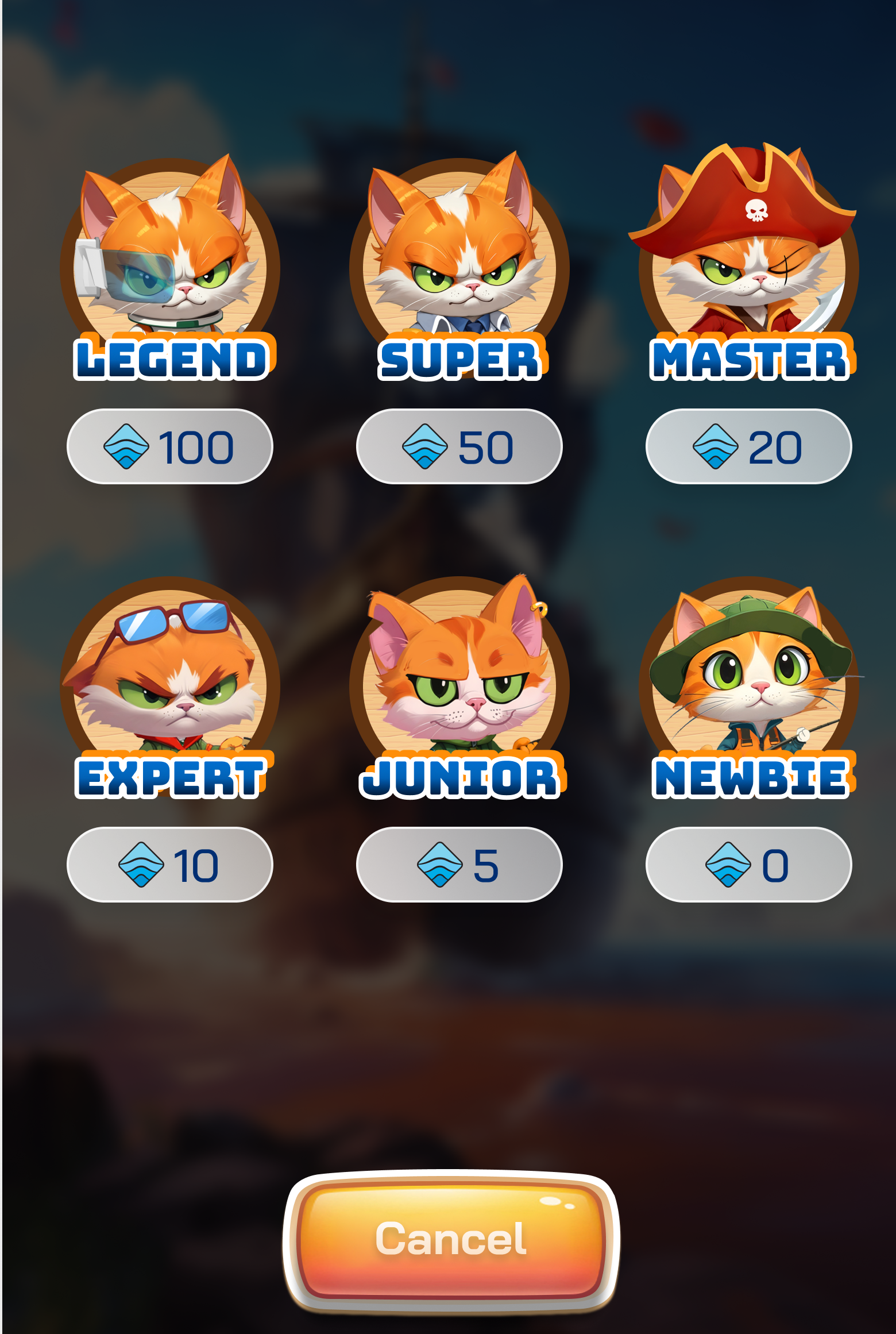
### OCEAN Pool:

> Total WAVE Points = (Win/Lose Points) + ([WAVE Points Bonus](/introduction/campaigns/wave-incentive-wave-points/wave-points-bonus))

| Pool      | Win🔥 | Lose💧 |
| --------- | ----- | ------ |
| 100 OCEAN | 8     | 2      |
| 50 OCEAN  | 4     | 1      |
| 20 OCEAN  | 1.6   | 0.4    |
| 10 OCEAN  | 0.8   | 0.2    |
| 5 OCEAN   | 0.4   | 0.1    |
| 0 OCEAN   | 0     | 0      |

### Other Pool - *Coming soon*


# WAVE Points Bonus

Users can earn additional WAVE Points from the Lucky Wheel and Battle Game, depending on the level of their seafood.

<table><thead><tr><th width="71">#</th><th width="526">Level</th><th>Bonus</th></tr></thead><tbody><tr><td>1</td><td>Level 1 - Shrimp</td><td>0%</td></tr><tr><td>2</td><td>Level 2 - Crab</td><td>25%</td></tr><tr><td>3</td><td>Level 3 - Octopus</td><td>50%</td></tr><tr><td>4</td><td>Level 4 - Dolphin</td><td>75%</td></tr><tr><td>5</td><td>Level 5 - Shark</td><td>100%</td></tr><tr><td>6</td><td>Level 6 - Whale</td><td>150%</td></tr></tbody></table>


# Roadmap

{% hint style="info" %}
As we progress and expand, our roadmap might undergo modifications. Make sure to keep abreast of these updates by connecting with us through our social media platforms to discover our upcoming plans!
{% endhint %}

<figure><img src="https://1657324024-files.gitbook.io/~/files/v0/b/gitbook-x-prod.appspot.com/o/spaces%2FO0OuE9apMynE1w94XSMA%2Fuploads%2FFuHzg0dNhFIU8Ysnk45Q%2FVISION%20(5).png?alt=media&amp;token=12ad074c-04be-4fb6-ac3c-258f12b1cfbd" alt=""><figcaption></figcaption></figure>

## Q4/2023&#x20;

* [x] Form the Wave Super Team <img src="https://web.telegram.org/k/assets/img/emoji/1f525.png" alt="🔥" data-size="line">
* [x] Form the Wave Artificial Intelligence Team <img src="https://web.telegram.org/k/assets/img/emoji/1f6f8.png" alt="🛸" data-size="line">
* [x] Design Wave Architecture <img src="https://web.telegram.org/k/assets/img/emoji/26a1.png" alt="⚡" data-size="line">

## Q1 & 2 - 2024

* [x] Introduce Wave Wallet - The new Era of Web3 Wallet <img src="https://web.telegram.org/k/assets/img/emoji/1f30a.png" alt="🌊" data-size="line">
* [x] Early Access - Mine $OCEAN <img src="https://web.telegram.org/k/assets/img/emoji/1f6f3.png" alt="🛳" data-size="line">
* [x] Wave Legends Season 1: WOG NFT - Mint by $OCEAN&#x20;
* [x] Ocean Treasure Season 1 🎉
* [x] Wave Legends Season 2: WOG NFT - Price by Community&#x20;
* [x] Ocean Treasure Season 2 🎉
* [x] First D-app: Lucky Wheel 🎁
* [x] Ocean Treasure Season 3 🎉
* [x] Second D-app: Battle Game ⚔️

## Q3 - 2024

* [x] Second D-app: Battle Game ⚔️
* [x] Partnership Collaboration, D-apps integration and 🎁😉
* [x] Third D-app - Wave Staking 💰
* [x] Anti-phishing Integrated <img src="https://web.telegram.org/k/assets/img/emoji/26a0.png" alt="⚠" data-size="line">
* [x] Introduce WavePad - Launchpad integrated <img src="https://web.telegram.org/k/assets/img/emoji/1f30b.png" alt="🌋" data-size="line">
* [x] WavePad 1 - Wave Genesis 🧑‍🚀

## Q4 - 2024

* [x] Wave Trading
* [x] Wave Trading meme - $WEWE
* [x] $WEWE TGE
* [x] Wave Trading Bot

## Q1 - 2025

* [ ] Meme Culture
* [ ] Wave Trading - Web version
* [ ] $WAV TGE
* [ ] CEX Listing
* [ ] Community Airdrop

## Q2 - 2025

* [ ] Wave Game #3
* [ ] Wave Trading: AI Tools Integration
* [ ] D-app Intergration
* [ ] Wave SDK

## Q3 + Q4 - 2025

* [ ] Multichain support
* [ ] Aggregator of cross-chain trading
* [ ] Wave X


# Gamefi

1. [OCEAN Game](/product/gamefi/ocean-game)
2. [Lucky Wheel](/product/gamefi/lucky-wheel)
3. [Battle Game](/product/gamefi/battle-game)


# OCEAN Game

The energy from the ocean will be condensed into the $OCEAN token - the in-game token of OCEAN Game. Those who hold $OCEAN will harness the power of the ocean and conquer new lands.

$OCEAN can be mined through the "[Early Access : Mine OCEAN](/introduction/campaigns/early-access-mine-ocean)" - OCEAN Game. Cats will set sail with boats to bring back $OCEAN for you.

<figure><img src="https://1657324024-files.gitbook.io/~/files/v0/b/gitbook-x-prod.appspot.com/o/spaces%2FO0OuE9apMynE1w94XSMA%2Fuploads%2FLUYpHc8OQdwXYXDSyDlC%2FOceanGame-01.png?alt=media&amp;token=8f9ac42f-d340-4380-a0ed-2d8517917aa9" alt=""><figcaption></figcaption></figure>

There are several ways for you to mine more $OCEAN:

1. Upgrade the skills of your cat.
2. Upgrade the boat's storage capacity to transport more $OCEAN.
3. Seek out fishing areas with seafood that contains more value in $OCEAN.


# Lucky Wheel

The Lucky Wheel is one of the first Dapps of Wave, providing unlimited earning opportunities and giving you the chance to win massive rewards.

Wheel Types:

1. [SUI Wheel](/product/gamefi/lucky-wheel/daily-sui-wheel-ocean)
2. [WOG NFT Wheel](/product/gamefi/lucky-wheel/daily-wog-nft-wheel-ocean)
3. [Special Wheel](/product/gamefi/lucky-wheel/special-wheel-ocean)
4. TBA


# Daily SUI Wheel - OCEAN

**Reward**: $**SUI** - Daily variation.

**Number of winners each round**: Daily variation.

**Price per ticket**: 10 $OCEAN.

**Ticket purchase time**: 24 hours from 11 AM UTC each day.

**Result announcement time:** 11 AM UTC each day.

**Participants:** Everyone.

**Winners**:&#x20;

* Winning tickets will be selected randomly by [Drand](https://drand.love/docs/). <br>
* The more tickets you have, the higher your chances of winning! If you are lucky, you might even own more than 1 winning ticket.&#x20;

Plus, enjoy a 5% discount in ticket price if you hold a WOG NFT.


# Daily WOG NFT  Wheel - OCEAN

**Reward**: **WOG NFT** - Daily variation.

**Number of winners each round**: Daily variation.

**Price per ticket**: 10 $OCEAN.

**Ticket purchase time**: 24 hours from 11 AM UTC each day.

**Result announcement time:** 11 AM UTC each day.

**Participants:** Everyone.

**Winners**:&#x20;

* Winning tickets will be selected randomly by [Drand](https://drand.love/docs/). <br>
* The more tickets you have, the higher your chances of winning! If you are lucky, you might even own more than 1 winning ticket.&#x20;

Plus, enjoy a 5% discount in ticket price if you hold a WOG NFT.


# Daily WOG NFT Wheel - SUI

**Reward**: **WOG NFT** - Daily variation.

**Number of winners each round**: Daily variation.

**Price per ticket**: 0.2 $SUI.

**Ticket purchase time**: 24 hours from 11 AM UTC each day.

**Result announcement time:** 11 AM UTC each day.

**Participants:** Everyone.

**Winners**:&#x20;

* Winning tickets will be selected randomly by [Drand](https://drand.love/docs/). <br>
* The more tickets you have, the higher your chances of winning! If you are lucky, you might even own more than 1 winning ticket.&#x20;

Plus, enjoy a 5% discount in ticket price if you hold a WOG NFT.


# Special Wheel - OCEAN

**Reward**: 3000 $**SUI.**

**Number of winners each round**: TBA.

**Price per ticket**: 10 $OCEAN.

**Ticket purchase time**: 24 hours.

**Date**: TBA

**Result announcement time:** Once per month.

**Participants:**&#x20;

* Lucky Wheel Winners within the month ([**Daily SUI Wheel - OCEAN**](/product/gamefi/lucky-wheel/daily-sui-wheel-ocean) **,** [**Daily WOG NFT Wheel - OCEAN**](/product/gamefi/lucky-wheel/daily-wog-nft-wheel-ocean)**,** [**Daily NFT Wheel - SUI**](/product/gamefi/lucky-wheel/daily-wog-nft-wheel-sui)**, etc)**
* Share your winner image on Twitter and complete the verification form.

**Winners**:&#x20;

* Winning tickets will be selected randomly by [Drand](https://drand.love/docs/). <br>
* The more tickets you have, the higher your chances of winning! If you are lucky, you might even own more than 1 winning ticket.&#x20;

Plus, enjoy a 5% discount in ticket price if you hold a WOG NFT.


# Battle Game

Raise the sails and head to the ocean to destroy the evil pirates, bringing peace to the people and earning special rewards.

&#x20;There are 3 modes to join:

1. [Single Mode](/product/gamefi/battle-game/single-mode)
2. [Tournament Mode](/product/gamefi/battle-game/tournament-mode)
3. [Spectate Mode](/product/gamefi/battle-game/spectate-mode)


# Single Mode

### HOW TO PLAY

### I. Pool Selection Phase

Pool Options:&#x20;

1. $OCEAN Pool
2. Others Pool - *Coming soon.*&#x20;

<figure><img src="https://1657324024-files.gitbook.io/~/files/v0/b/gitbook-x-prod.appspot.com/o/spaces%2FO0OuE9apMynE1w94XSMA%2Fuploads%2FAxqmLZVpyhbNECr0VROX%2Fselect_pool.png?alt=media&amp;token=e26f03ee-15fd-4fb4-8a13-2691450d2fce" alt="" width="375"><figcaption></figcaption></figure>

### II. Matching Phase&#x20;

<figure><img src="https://1657324024-files.gitbook.io/~/files/v0/b/gitbook-x-prod.appspot.com/o/spaces%2FO0OuE9apMynE1w94XSMA%2Fuploads%2FP9QBXqOmSzUms8XlZvSu%2Fmatching.png?alt=media&amp;token=e0230e86-965f-4aea-8d9b-8b3e1d4b5421" alt="" width="375"><figcaption></figcaption></figure>

1. **Starting Phase:** The system randomly selects a player of similar rank to match.&#x20;
2. **Matching Time:** Depends on the number of players online at the time.&#x20;
3. **Matching Success**: When an opponent is found, an amount of OCEAN corresponding to the Pool Size will be deposited for the battle.
4. **Cancel Matching:** During this phase, players can choose to "Cancel" to abort the game.&#x20;

<figure><img src="https://1657324024-files.gitbook.io/~/files/v0/b/gitbook-x-prod.appspot.com/o/spaces%2FO0OuE9apMynE1w94XSMA%2Fuploads%2FVcSIJyOoeUvJXLpAqJtH%2Fmatch.png?alt=media&amp;token=e98c5046-86f9-480d-8730-b7dcc060ea24" alt="" width="375"><figcaption></figcaption></figure>

### III. Deployment Phase

<figure><img src="https://1657324024-files.gitbook.io/~/files/v0/b/gitbook-x-prod.appspot.com/o/spaces%2FO0OuE9apMynE1w94XSMA%2Fuploads%2FVKRHV7PolN0K4HdTHnix%2Fimage.png?alt=media&amp;token=4b861b70-9e92-4436-9792-e4fd15eca531" alt="" width="375"><figcaption></figcaption></figure>

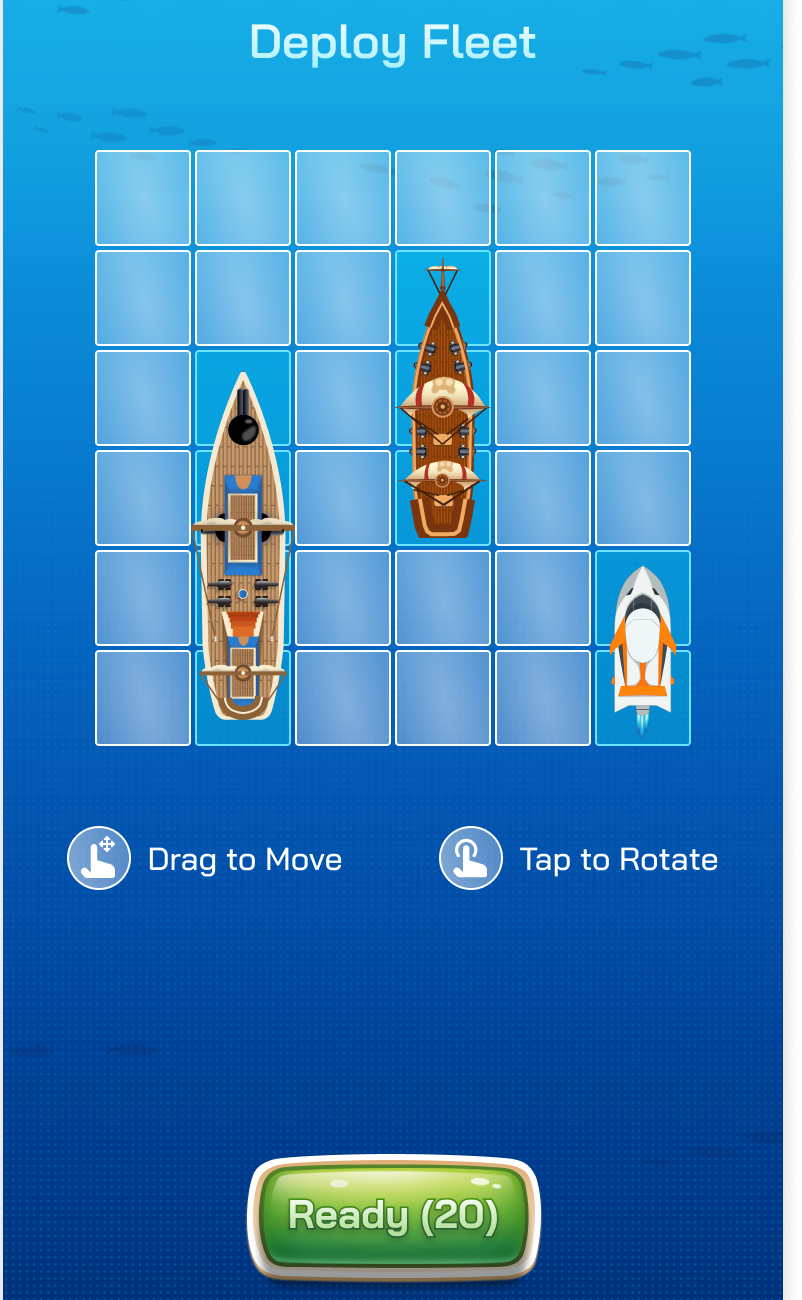
1. **Map and Ships**: The game map is 6x6 squares.&#x20;
2. **Ship Ownership**: Each player owns 3 ships of different sizes: **1x2, 1x3, and 1x4.**&#x20;
3. **Arranging Ships:** Players have 20 seconds to arrange their 3 ships on the map as desired.&#x20;

* Use drag actions to move ships.&#x20;
* Use tap actions to rotate ships.     &#x20;

4. **Completion of Deployment:** Once arranged, press "Ready" to complete this phase.&#x20;

### IV. Battle Phase

<figure><img src="https://1657324024-files.gitbook.io/~/files/v0/b/gitbook-x-prod.appspot.com/o/spaces%2FO0OuE9apMynE1w94XSMA%2Fuploads%2F2cwoPDDHd4gb5DBolNzq%2Fimage.png?alt=media&amp;token=902c781f-98b9-4f0f-818f-cccd7dd5b5e1" alt="" width="302"><figcaption></figcaption></figure>

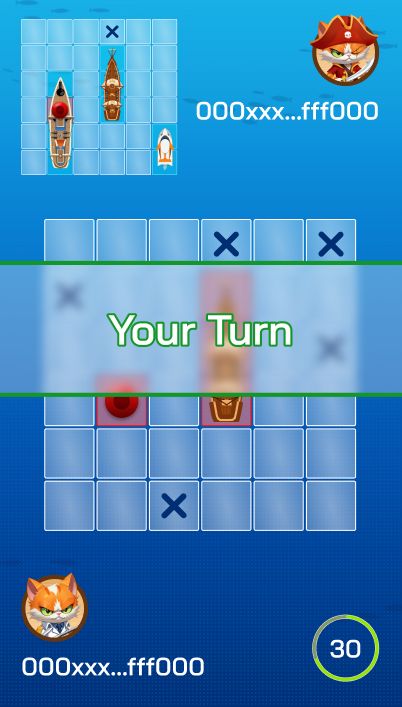
1. **First Attack:** One player is randomly chosen to make the first attack.&#x20;
2. **Attacking:**&#x20;

* Players have 30 seconds to select a position on the 6x6 map to attack.&#x20;
* Cannot attack the same position twice.&#x20;
* Successfully hitting an opponent's ship grants an additional attack.&#x20;
* Missing transfers the attack turn to the opponent.&#x20;

### V. Victory Phase

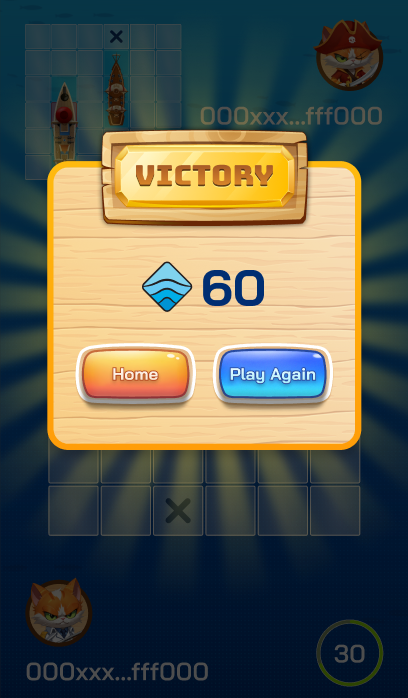
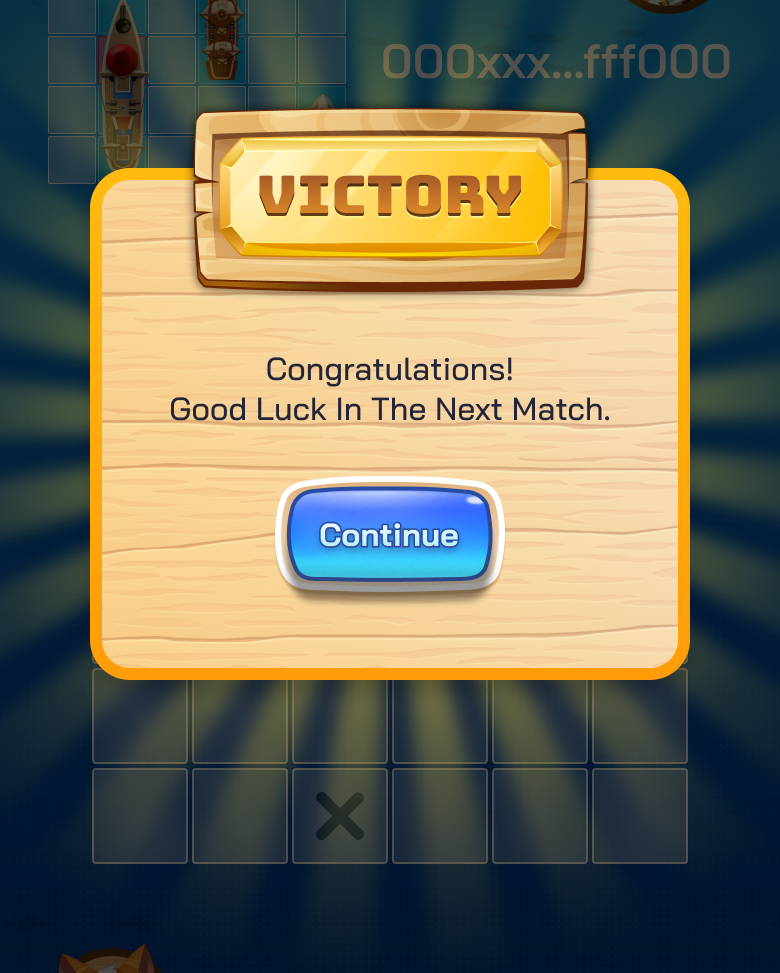
<figure><img src="https://1657324024-files.gitbook.io/~/files/v0/b/gitbook-x-prod.appspot.com/o/spaces%2FO0OuE9apMynE1w94XSMA%2Fuploads%2Fm11Mo0xlOvg2xm1eF6Kf%2Fimage.png?alt=media&amp;token=9c1aff50-3dd2-4c03-910c-1b931f8e62fc" alt="" width="306"><figcaption></figcaption></figure>

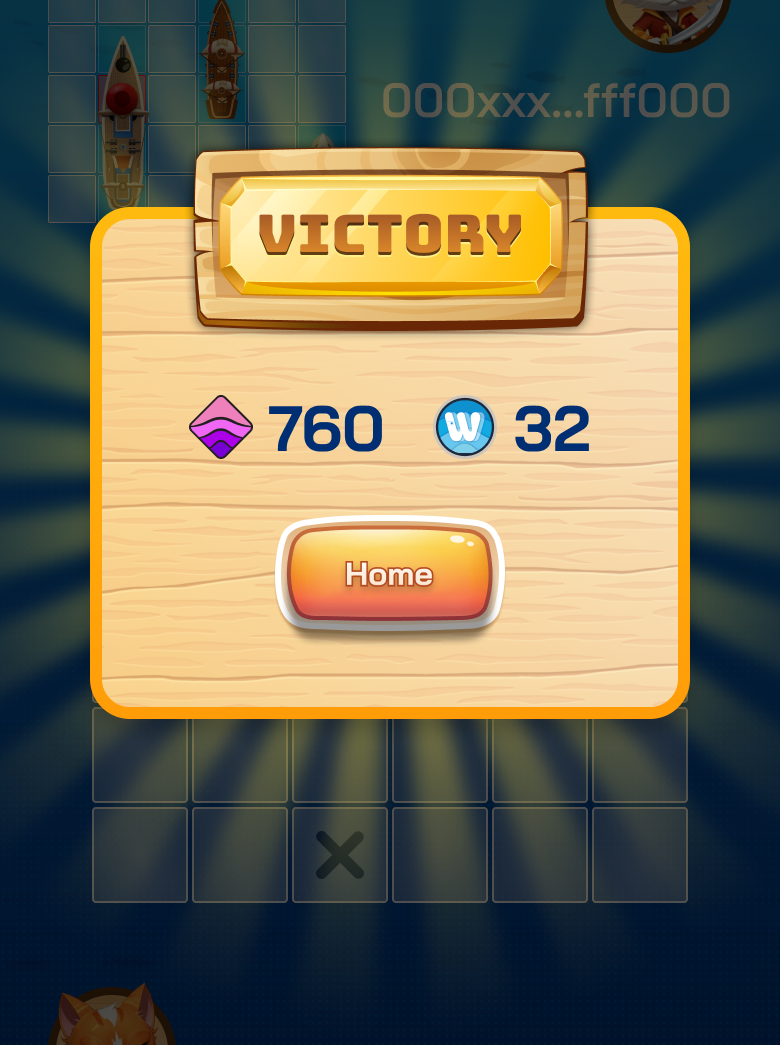
1. **Victory:** A player wins by successfully attacking all ship positions (3 ships - 9 positions) of the opponent's ships. The victorious player will receive:

* Received double the deposited OCEAN amount, minus a 5% system fee (only 2.5% for WOG Holders).
* [WAVE points.](/introduction/campaigns/wave-incentive-wave-points/battle-game)

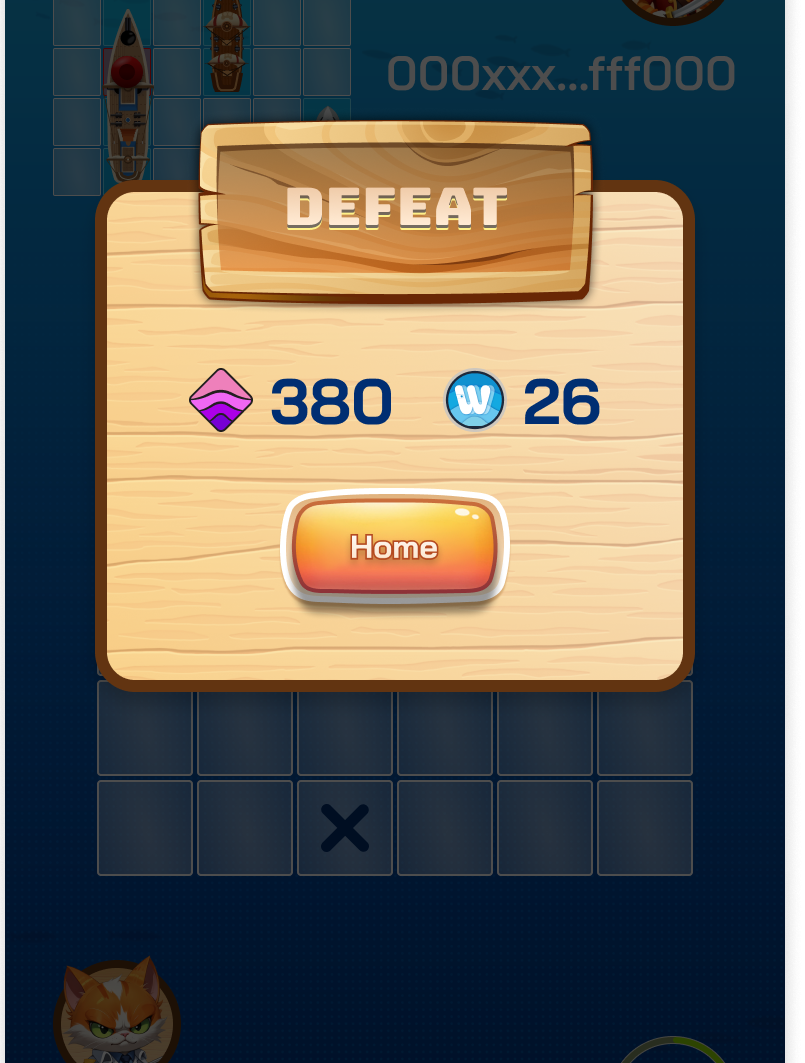
2. **Defeat:** A player loses if all their ship positions (3 ships - 9 positions) are successfully attacked by the opponent. The defeated player willd receive:

* [WAVE points.](/introduction/campaigns/wave-incentive-wave-points/battle-game)

### Notes

* If ship arrangement isn't completed within 20 seconds in the Deployment Phase, the system uses the most recent valid arrangement for the Battle Phase.&#x20;
* Careful planning and strategic decision-making in ship arrangement and attacks are crucial for victory.&#x20;
* Players must make an attack within 30 seconds during the Battle Phase, or they automatically lose the match.&#x20;

Enjoy playing the game and good luck!&#x20;


# Tournament Mode

### HOW TO PLAY

### I. Pool Selection Phase

Pool Options:&#x20;

1. $OCEAN Pool
2. One-Piece Pool

* Users who lost more than 20 OCEAN the previous day are eligible to participate and can only join one tournament per day.
* The Wave Team covers the entire participation fee of this pool. This OCEAN is sourced from the Lucky Wheel.
* **Number of tournaments each day**: Daily variation.

3. Others Pool - *Coming soon.*&#x20;

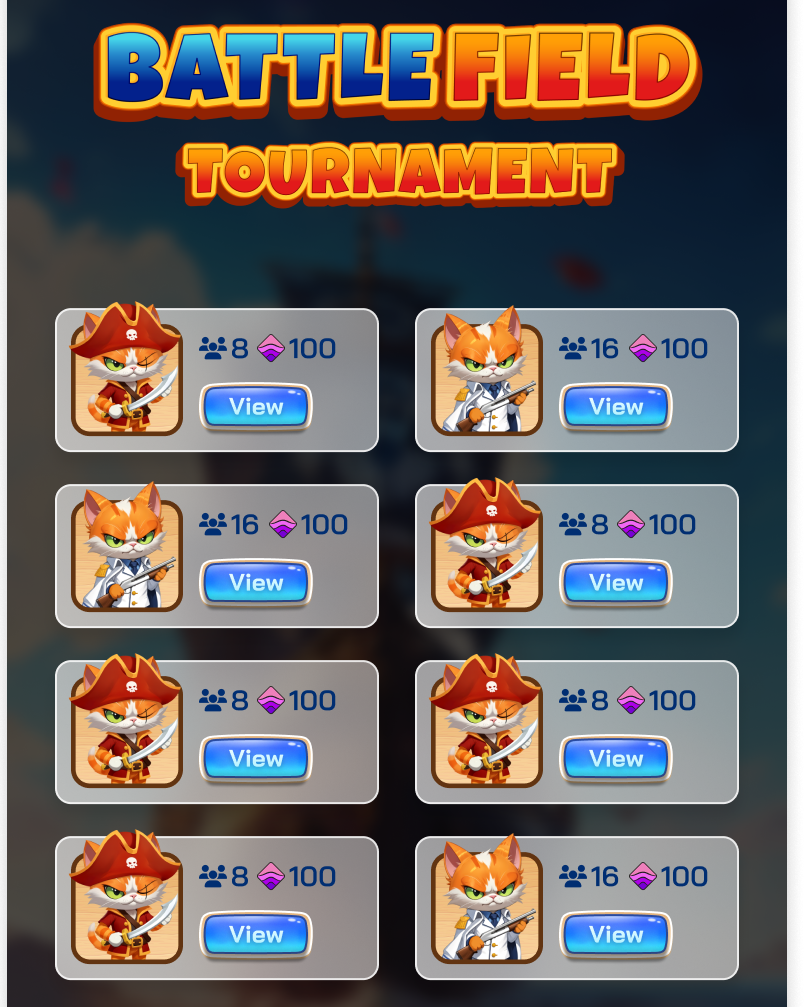
<figure><img src="https://1657324024-files.gitbook.io/~/files/v0/b/gitbook-x-prod.appspot.com/o/spaces%2FO0OuE9apMynE1w94XSMA%2Fuploads%2FV5QiQAHEQ4OXCGyV7ERY%2Fimage.png?alt=media&amp;token=090011f3-d873-4317-ab70-ca8ec111deb1" alt="" width="375"><figcaption></figcaption></figure>

### II. Matching Phase&#x20;

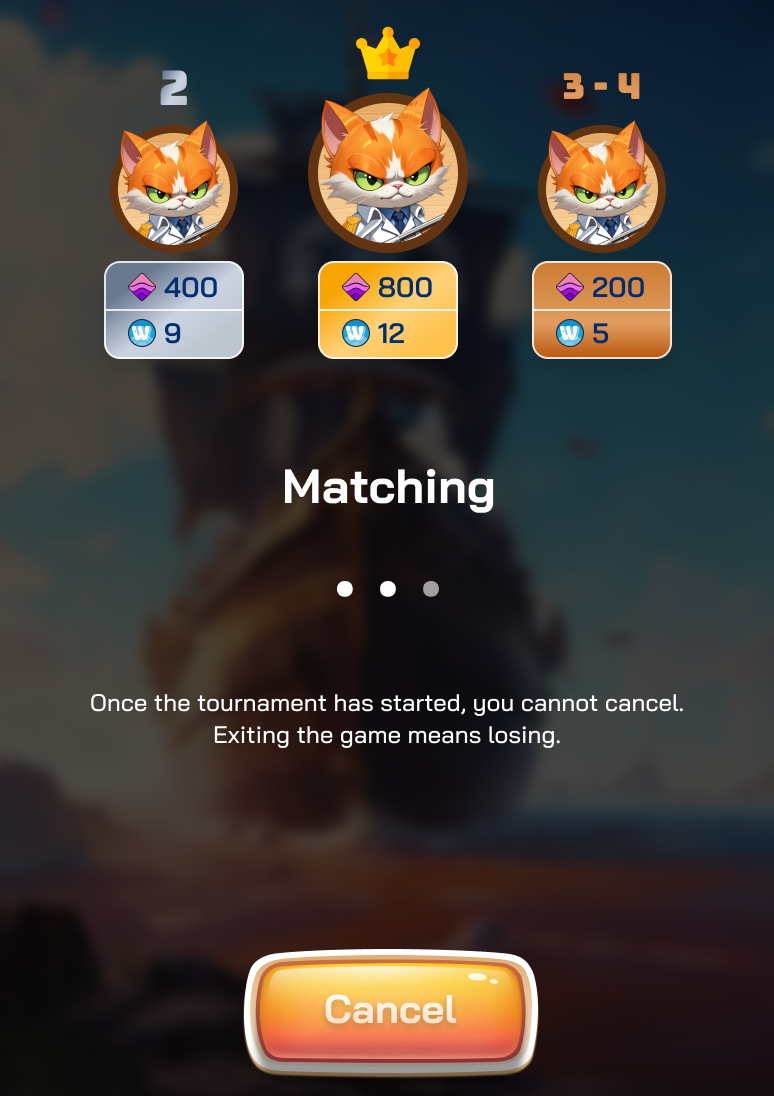
<figure><img src="https://1657324024-files.gitbook.io/~/files/v0/b/gitbook-x-prod.appspot.com/o/spaces%2FO0OuE9apMynE1w94XSMA%2Fuploads%2Fx3imWO27nwVdlZsQ2Uiy%2Fimage.png?alt=media&amp;token=f552f5c1-b08c-4821-b60a-2e20a6f1c21f" alt="" width="375"><figcaption></figcaption></figure>

* **Starting Phase**: The system selects players of similar rank to form a tournament pool of the specified size.
* **Matching Time**: This depends on the number of players online at the time.
* **Tournament Start**: Once the pool is filled, an amount of OCEAN corresponding to the Pool Size will be deposited for the tournament.
* **Cancel Participation**: During the registration phase, players can choose to "Cancel" to leave the tournament.

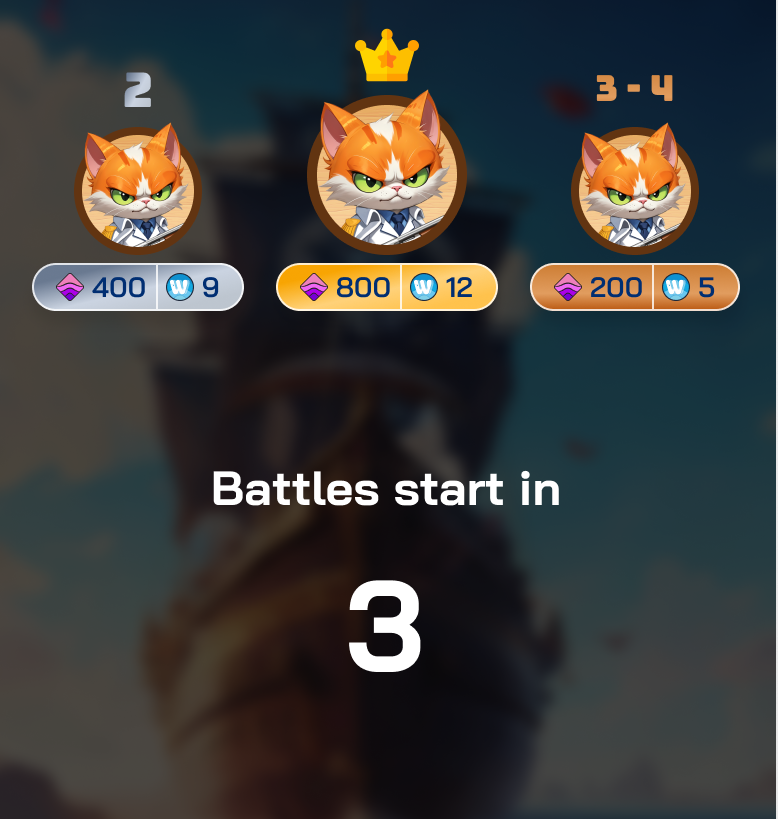
<figure><img src="https://1657324024-files.gitbook.io/~/files/v0/b/gitbook-x-prod.appspot.com/o/spaces%2FO0OuE9apMynE1w94XSMA%2Fuploads%2FmlZsPv2xg2MOW4FUYdEV%2Fimage.png?alt=media&amp;token=941b04a2-c6ad-4858-9de3-17cc7efe6398" alt="" width="375"><figcaption></figcaption></figure>

### III. Pairing Phase

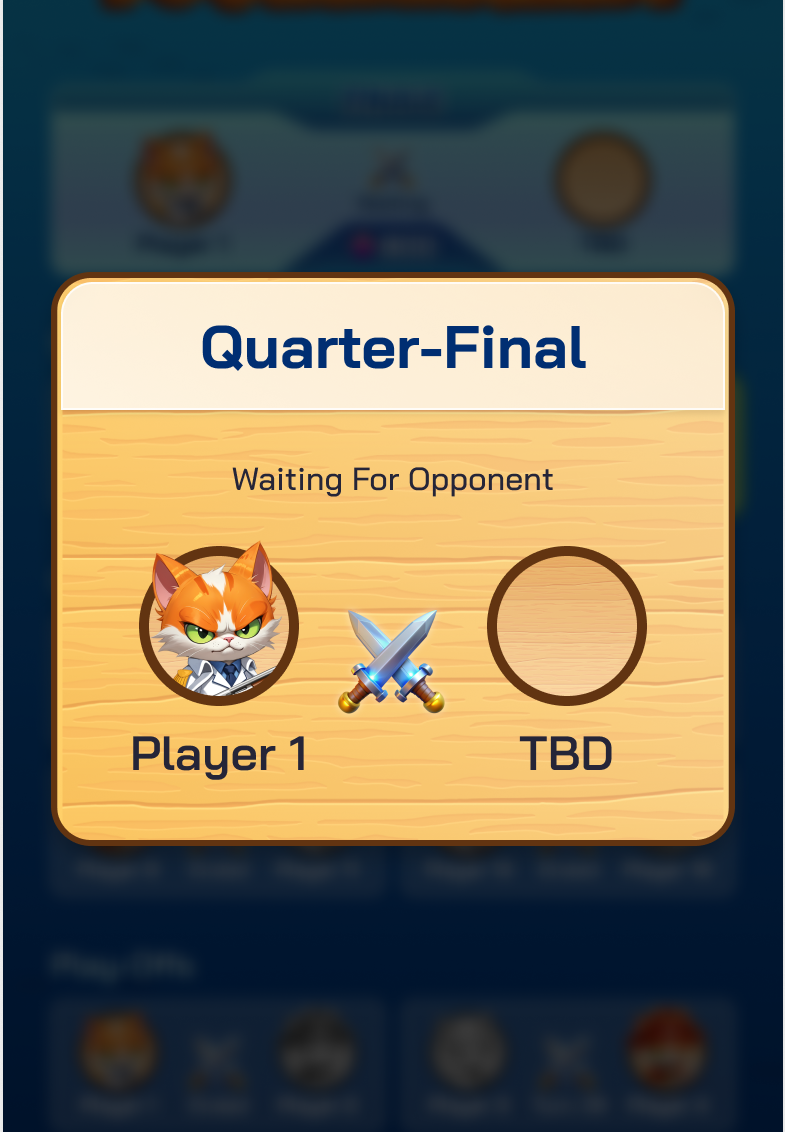
Players will be paired to start the round. This phase will be repeated throughout the tournament. The pairing time will end when both players have completed the previous round and are ready to continue.

<figure><img src="https://1657324024-files.gitbook.io/~/files/v0/b/gitbook-x-prod.appspot.com/o/spaces%2FO0OuE9apMynE1w94XSMA%2Fuploads%2FMCkdhWN8u4jMsiUTyVSt%2Fimage.png?alt=media&amp;token=5e32b493-38f3-4741-adef-9ffcdddbb547" alt="" width="375"><figcaption></figcaption></figure>

As soon as both players are ready, the round will begin, and players will enter the Deployment Phase.

### IV. Deployment Phase

<figure><img src="https://1657324024-files.gitbook.io/~/files/v0/b/gitbook-x-prod.appspot.com/o/spaces%2FO0OuE9apMynE1w94XSMA%2Fuploads%2FVKRHV7PolN0K4HdTHnix%2Fimage.png?alt=media&amp;token=4b861b70-9e92-4436-9792-e4fd15eca531" alt="" width="375"><figcaption></figcaption></figure>

1. **Map and Ships**: The game map is 6x6 squares.&#x20;
2. **Ship Ownership**: Each player owns 3 ships of different sizes: **1x2, 1x3, and 1x4.**&#x20;
3. **Arranging Ships:** Players are allotted 20 seconds to strategically position their three ships on the map according to their preferences.

* Use drag actions to move ships.&#x20;
* Use tap actions to rotate ships.     &#x20;

4. **Completion of Deployment:** Once arranged, press "Ready" to complete this phase.&#x20;

### V. Battle Phase

<figure><img src="https://1657324024-files.gitbook.io/~/files/v0/b/gitbook-x-prod.appspot.com/o/spaces%2FO0OuE9apMynE1w94XSMA%2Fuploads%2F2cwoPDDHd4gb5DBolNzq%2Fimage.png?alt=media&amp;token=902c781f-98b9-4f0f-818f-cccd7dd5b5e1" alt="" width="302"><figcaption></figcaption></figure>

1. **First Attack:** One player is randomly chosen to make the first attack.&#x20;
2. **Attacking:**&#x20;

* Players have 30 seconds to select a position on the 6x6 map to attack.&#x20;
* Cannot attack the same position twice.&#x20;
* Successfully hitting an opponent's ship grants an additional attack.&#x20;
* Missing transfers the attack turn to the opponent.&#x20;

### V. Battle Winning Phase

**Battle Win:** A player wins by successfully attacking all ship positions (3 ships - 9 positions) of the opponent's ships.

<figure><img src="https://1657324024-files.gitbook.io/~/files/v0/b/gitbook-x-prod.appspot.com/o/spaces%2FO0OuE9apMynE1w94XSMA%2Fuploads%2FSgq0Y6qrX6c2EGpaeN3M%2Fimage.png?alt=media&amp;token=610ccd07-0feb-4d0c-9a92-43b90f15a61a" alt="" width="375"><figcaption></figcaption></figure>

The winner will continue in the tournament until they either lose or achieve final victory.

The loser will receive rewards based on their final ranking then move to [Spectate Mode](/product/gamefi/battle-game/spectate-mode):

* Received the OCEAN reward, minus a 5% system fee (only 2.5% for WOG Holders).
* [WAVE points.](/introduction/campaigns/wave-incentive-wave-points/battle-game)

<figure><img src="https://1657324024-files.gitbook.io/~/files/v0/b/gitbook-x-prod.appspot.com/o/spaces%2FO0OuE9apMynE1w94XSMA%2Fuploads%2FpCIoqf54nUCmRj8Ns6iG%2Fimage.png?alt=media&amp;token=9c1c7075-b90e-43d2-b80e-479407662419" alt="" width="375"><figcaption></figcaption></figure>

<figure><img src="https://1657324024-files.gitbook.io/~/files/v0/b/gitbook-x-prod.appspot.com/o/spaces%2FO0OuE9apMynE1w94XSMA%2Fuploads%2F0g5Ibz1ps9eC2g7qdJXK%2Fimage.png?alt=media&amp;token=a6fc1d91-96fd-44dd-a8ac-ff330253deb9" alt="" width="375"><figcaption></figcaption></figure>

### VI. Final Victory Phase

**Final Winner**: The player who wins all matches in the tournament will achieve the final victory. The rewards for the final winner are:

* Received the OCEAN reward, minus a 5% system fee (only 2.5% for WOG Holders).
* [WAVE points.](/introduction/campaigns/wave-incentive-wave-points/battle-game)

<figure><img src="https://1657324024-files.gitbook.io/~/files/v0/b/gitbook-x-prod.appspot.com/o/spaces%2FO0OuE9apMynE1w94XSMA%2Fuploads%2F8NL9rGFJITl6CWARPzTm%2Fimage.png?alt=media&amp;token=779eba0a-66e6-4581-b35b-63204aaf9bfc" alt="" width="375"><figcaption></figcaption></figure>

### Notes

* If ship arrangement isn't completed within 20 seconds in the Deployment Phase, the system uses the most recent valid arrangement for the Battle Phase.&#x20;
* Careful planning and strategic decision-making in ship arrangement and attacks are crucial for victory.&#x20;
* Players must make an attack within 30 seconds during the Battle Phase, or they automatically lose the match.&#x20;

Enjoy playing the game and good luck!&#x20;


# Spectate Mode

**Spectate Mode** brings transparency to every match of the Battle Game. Players can watch all ongoing matches to:

* Verify the transparency of Battle Game.
* Learn strategies from other players.

### I. Single Games

<figure><img src="https://1657324024-files.gitbook.io/~/files/v0/b/gitbook-x-prod.appspot.com/o/spaces%2FO0OuE9apMynE1w94XSMA%2Fuploads%2FUykQTeHcZmJ25UWzMfhQ%2Fimage.png?alt=media&amp;token=32618b3a-10dd-4d33-898a-64586bb5ee0e" alt="" width="375"><figcaption></figcaption></figure>

<figure><img src="https://1657324024-files.gitbook.io/~/files/v0/b/gitbook-x-prod.appspot.com/o/spaces%2FO0OuE9apMynE1w94XSMA%2Fuploads%2F77VTk9z6q5qRrlr3VHbx%2Fimage.png?alt=media&amp;token=5a9c2184-10aa-47d4-a369-de3896ca320c" alt="" width="375"><figcaption></figcaption></figure>

### **II. Tournament Games**

<figure><img src="https://1657324024-files.gitbook.io/~/files/v0/b/gitbook-x-prod.appspot.com/o/spaces%2FO0OuE9apMynE1w94XSMA%2Fuploads%2F04GsdafmCtIEw9EoxynR%2Fimage.png?alt=media&amp;token=5e4ea858-891c-4fca-821f-e101245fd04d" alt="" width="375"><figcaption></figcaption></figure>

<figure><img src="https://1657324024-files.gitbook.io/~/files/v0/b/gitbook-x-prod.appspot.com/o/spaces%2FO0OuE9apMynE1w94XSMA%2Fuploads%2FRUKOXdsqviQL0UGZIDjY%2Fimage.png?alt=media&amp;token=6f5e9706-9493-4802-aecb-c9ac5525ed79" alt="" width="375"><figcaption></figcaption></figure>


# DeFi

1. [Wave Staking](/product/defi/wave-staking)
2. [WavePad](/product/defi/wave-pad)
3. [Wave Trading](/product/defi/wave-trading)


# Wave Staking

Receive more valuable rewards easily with Wave Staking. Join now and start enjoying the benefits of seamless rewards acquisition today!

There are 3 assets that Wave Staking supports:

1. [Stake WOG NFT](/product/defi/wave-staking/wog-staking) to get [WAVE Points](/introduction/campaigns/wave-incentive-wave-points).
2. [Stake OCEAN](/product/defi/wave-staking/ocean-staking) to get [WAVE Points](/introduction/campaigns/wave-incentive-wave-points).
3. [Supply SUI](/product/defi/wave-staking/sui-supplying) to get SUI.
4. Others - *Coming soon*


# WOG Staking

Staking **WOG NFTs** to earn **WAVE Points:**

**Reward**: Earn an additional WAVE Points per day based on number of NFT staked.&#x20;

**Additional WAVE Points**:

* 100% for the first NFT staked.

Reduced by half starting from the 2nd NFT

* 50% for the second NFT staked.
* 25% for the third NFT staked.
* ...&#x20;

**Staking Duration**: 7 continuous days. **You cannot un-stake NFTs during this 7-days period.**


# OCEAN Staking

Staking **OCEAN** to earn **Wave Points:**

* **Reward**: For each OCEAN staked, you can earn Wave Points with an APY of up to 15% **(early access)**. The APY will gradually transition from a fixed concept to a flexible APY concept.
* **Staking Duration**: 7 continuous days.&#x20;
* **You cannot un-stake OCEAN during this 7-days period.**
* **Formula**: Wave Points Earned=Amount of OCEAN×(APY/365)×Staking Duration×Seafood Level.


# SUI Supplying

Supplying **SUI** to earn **SUI**:

* **Asset**: Your assets are supplied on the NAVI Protocol. **Please do your own research (DYOR) before making any investment decisions. Visit** [**NAVI Protocol Documents**](https://naviprotocol.gitbook.io/navi-protocol-docs) **for more detail.**
* **Reward**: For each SUI supplied, you can earn additional SUI **(please check the NAVI website for current rates).**
* **Supplying Duration**: You can withdraw SUI at any time.


# Others - Coming soon

{% hint style="info" %}
*Coming soon!*
{% endhint %}


# Wave Pad

<figure><img src="https://1657324024-files.gitbook.io/~/files/v0/b/gitbook-x-prod.appspot.com/o/spaces%2FO0OuE9apMynE1w94XSMA%2Fuploads%2FMDa67Z0vGOcXAWCcTz4H%2FFrame%201072%20(2).png?alt=media&amp;token=54bfa833-56ec-460c-8cea-04bcafd41330" alt=""><figcaption></figcaption></figure>

Wave Pad is the integrated launchpad in the Wave ecosystem. Wave Pad revolutionizes the way that innovative projects find support and retail users find the bluechip startup investment opportunities.

Wave Pad ensures fair, transparent, efficient and easy-to-use funding processes to connect visionary builders and passionate communities, making quality projects with huge potential accessible to everyone, not the elite few. By prioritizing long-term value creation over short-term gains, Wave Pad is the ultimate platform for start-ups composed by real builders to get their chances.

Wave Pad will first support projects such as memes and assets on the Sui ecosystem. After multi-chain deployment of Wave, Wave Pad will also be supporting other ecosystem projects with not only funds but also a strong community backed by Wave’s large user base.


# Wave Trading

<figure><img src="https://1657324024-files.gitbook.io/~/files/v0/b/gitbook-x-prod.appspot.com/o/spaces%2FO0OuE9apMynE1w94XSMA%2Fuploads%2FkRSvMn7FFqctHuUmYU7d%2Fwave-trading-01.png?alt=media&amp;token=d184580b-e385-4967-aba7-e800a0341384" alt=""><figcaption></figcaption></figure>

Wave Trading enhances the user experience in trading meme tokens on Sui. Now, you can trade tokens at lightspeed directly on Telegram.

✨ **Meme Token Creation**: Create your own meme tokens.&#x20;

📊 **Trading Options**: Buy memes with SUI using market and limit orders.&#x20;

🔗 **Instant Sharing**: Share meme trades instantly via message and let others trade directly from it!

### Wave Trading Incentive

When using Wave Trading, users will receive WAVE Points and $WEWE, the incentive token of Meme Culture.


# Wave Trading: Revolutionizing Meme Token Trading on Sui

<figure><img src="https://1657324024-files.gitbook.io/~/files/v0/b/gitbook-x-prod.appspot.com/o/spaces%2FO0OuE9apMynE1w94XSMA%2Fuploads%2FkRSvMn7FFqctHuUmYU7d%2Fwave-trading-01.png?alt=media&amp;token=d184580b-e385-4967-aba7-e800a0341384" alt=""><figcaption></figcaption></figure>

Wave Trading has taken the world of meme token trading by storm, providing a seamless, lightning-fast experience right on Telegram. Built on the Sui blockchain, Wave Trading simplifies and accelerates the way users engage with meme tokens. With its innovative features, traders can now enjoy the full potential of meme trading without the usual delays or complications found on other platforms.

### Main Functions of Wave Trading&#x20;

Wave Trading offers a suite of powerful tools and features that enhance the overall trading experience, particularly for meme tokens:&#x20;

#### **1. Meme Token Creation**&#x20;

Have an idea for a meme token? With Wave Trading, creating your own token is a breeze. Whether it's for a community, a joke, or a full-fledged project, Wave Trading makes it easy for users to design and launch their own meme tokens on the Sui blockchain, unlocking endless possibilities for creativity and engagement.&#x20;

#### 2. Trading Options&#x20;

Wave Trading allows users to trade meme tokens with ease using $SUI. The platform supports both market and limit orders, giving traders flexibility in how they buy and sell tokens. Whether you're looking for immediate transactions or want to set specific price targets, Wave Trading has got you covered.&#x20;

Wave Trading integrates the latest version of TradingView charts into this Technical Analysis Chart section. TradingView provides traders with the most convenient analytical tools for various assets across all markets, including stocks, forex, commodities like gold or silver, and [BTCUSD](https://www.tradingview.com/symbols/BTCUSD/).&#x20;

#### 3. Instant Trade Sharing&#x20;

Wave Trading introduces a feature that sets it apart from traditional trading platforms: the ability to instantly share trades. After executing a trade, you can send a message to your contacts with the details, allowing them to execute the same trade directly from their chat. This makes it easier to spread the word about meme tokens and get more people involved in trading.&#x20;

### Incentives: Earn $WEWE and WAVE Points&#x20;

Wave Trading isn’t just about making trades—it also rewards users for their activities. Each time you use the platform, you earn WAVE Points and $WEWE, the incentive token of the Meme Culture community. This system encourages active participation and rewards traders for their involvement, making it more engaging and fun to trade meme tokens.&#x20;

Wave Trading is reshaping how users trade meme tokens, making it easier, faster, and more rewarding. If you’re ready to explore this exciting new world of trading, start creating and trading your own meme tokens today! 🌊&#x20;


# Wave Trading Bot

<figure><img src="https://1657324024-files.gitbook.io/~/files/v0/b/gitbook-x-prod.appspot.com/o/spaces%2FO0OuE9apMynE1w94XSMA%2Fuploads%2FMCTrXXBAAYaqdeOdVJDl%2Fphoto_2024-12-04_17-30-22.jpg?alt=media&amp;token=0c67878e-b138-444a-a695-3c42f825ffc0" alt=""><figcaption></figcaption></figure>

Welcome to Wave Trading Bot By Wave! Trade tokens effortlessly on the Sui Blockchain—fast, secure, and reliable.

1. [First Steps](/product/defi/wave-trading-bot/first-steps)
2. [Trading Functions](/product/defi/wave-trading-bot/trading-functions)
3. [Referral Program](/product/defi/wave-trading-bot/referral-program)
4. [Sniper Functions](/product/defi/wave-trading-bot/sniper-functions)


# First Steps

### 1. Create and manage wallets

To get started type `/start` and navigate to the `Wallets` button on the menu pallet or using `/wallet` command

#### Creating New Wallets

To create a single Wallet, click `New Wallet`. If you want to create multiple Wallets at once (up to 5 Wallets), select `New X Wallet`.

<div align="left"><figure><img src="https://1657324024-files.gitbook.io/~/files/v0/b/gitbook-x-prod.appspot.com/o/spaces%2FO0OuE9apMynE1w94XSMA%2Fuploads%2FjAzJSOhZyOjCtR56U964%2FGen%20Wallet%20New%201.png?alt=media&amp;token=8f4c9e52-23e4-4d21-8874-cf928c5a50f1" alt=""><figcaption></figcaption></figure> <figure><img src="https://1657324024-files.gitbook.io/~/files/v0/b/gitbook-x-prod.appspot.com/o/spaces%2FO0OuE9apMynE1w94XSMA%2Fuploads%2FL8UJpfPIexCrtugOtWz7%2FGen%20Wallet%20New%202.png?alt=media&amp;token=918e9458-44f7-4d2f-9d57-cac415ade696" alt=""><figcaption></figcaption></figure> <figure><img src="https://1657324024-files.gitbook.io/~/files/v0/b/gitbook-x-prod.appspot.com/o/spaces%2FO0OuE9apMynE1w94XSMA%2Fuploads%2FIzibuXgGhGgX7cfgZuxH%2FGen%20Wallet%20New%203.png?alt=media&amp;token=a4e7b21d-4f4f-4b48-9ae8-a2ab9642e7e3" alt=""><figcaption></figcaption></figure></div>

#### Managing Your Wallet Credentials

After creating a new wallet, the bot will provide you with a fresh wallet address and a private key. Ensure you save these credentials securely and delete the message from the bot to keep your information private and secure.

#### Importing an Existing Wallet

If you already have a wallet, you can easily import it into the bot by clicking on `Import Wallet` and pasting your private key into the bot.

<div><figure><img src="https://1657324024-files.gitbook.io/~/files/v0/b/gitbook-x-prod.appspot.com/o/spaces%2FO0OuE9apMynE1w94XSMA%2Fuploads%2FXk8qL4IOA7H0U4TqAwzW%2FImport%20New%201.png?alt=media&amp;token=50e441e6-f9f9-4829-9c6f-11f281829d13" alt=""><figcaption></figcaption></figure> <figure><img src="https://1657324024-files.gitbook.io/~/files/v0/b/gitbook-x-prod.appspot.com/o/spaces%2FO0OuE9apMynE1w94XSMA%2Fuploads%2FfCurNRZLrlmk9TMSfdGf%2FImport%20New%202.png?alt=media&amp;token=956ab837-8110-4281-992b-e1823d62ae67" alt=""><figcaption></figcaption></figure></div>

#### Withdrawing Sui/tokens or Deleting a Wallet Address&#x20;

If you want to withdraw SUI/tokens, or delete your wallet, simply click on the desired wallet address and select the appropriate option. This will be explained in more detail later in the guide.&#x20;

<div><figure><img src="https://1657324024-files.gitbook.io/~/files/v0/b/gitbook-x-prod.appspot.com/o/spaces%2FO0OuE9apMynE1w94XSMA%2Fuploads%2FCVqCNynfBk3IRX3jyReH%2FWallets%203.png?alt=media&amp;token=266135b2-bf8e-41bb-83d6-a8b8ae5524e7" alt=""><figcaption></figcaption></figure> <figure><img src="https://1657324024-files.gitbook.io/~/files/v0/b/gitbook-x-prod.appspot.com/o/spaces%2FO0OuE9apMynE1w94XSMA%2Fuploads%2F3ztA4xAWOJybjXFdv8Q3%2FWallet%204.png?alt=media&amp;token=d4fe0333-2406-4867-9876-f4696ed01fcd" alt=""><figcaption></figcaption></figure></div>

### 2. Configuration Setting

You can customize the settings to better suit your strategies through the configuration options available in the main menu.

By pressing `Config` button or using `/config` command, the bot will open the settings panel, allowing you to customize your trading fees and slippage to enhance your trading experience.&#x20;

<div><figure><img src="https://1657324024-files.gitbook.io/~/files/v0/b/gitbook-x-prod.appspot.com/o/spaces%2FO0OuE9apMynE1w94XSMA%2Fuploads%2Fv09rW1YX5ja0NNlxWBY3%2FConfig%20New%201.png?alt=media&amp;token=1b67a5c0-d9a3-4ad3-9788-5fbb92ee12f9" alt=""><figcaption></figcaption></figure> <figure><img src="https://1657324024-files.gitbook.io/~/files/v0/b/gitbook-x-prod.appspot.com/o/spaces%2FO0OuE9apMynE1w94XSMA%2Fuploads%2Fm2QBdpyp0y1ZcGoLcpAh%2FConfig%202.png?alt=media&amp;token=0f28bf47-c7eb-47ca-bd93-8a653737f89e" alt=""><figcaption></figcaption></figure></div>


# Trading Functions

Once you have created a wallet, youʼre ready to start trading. Hereʼs a quick overview of the basics:&#x20;

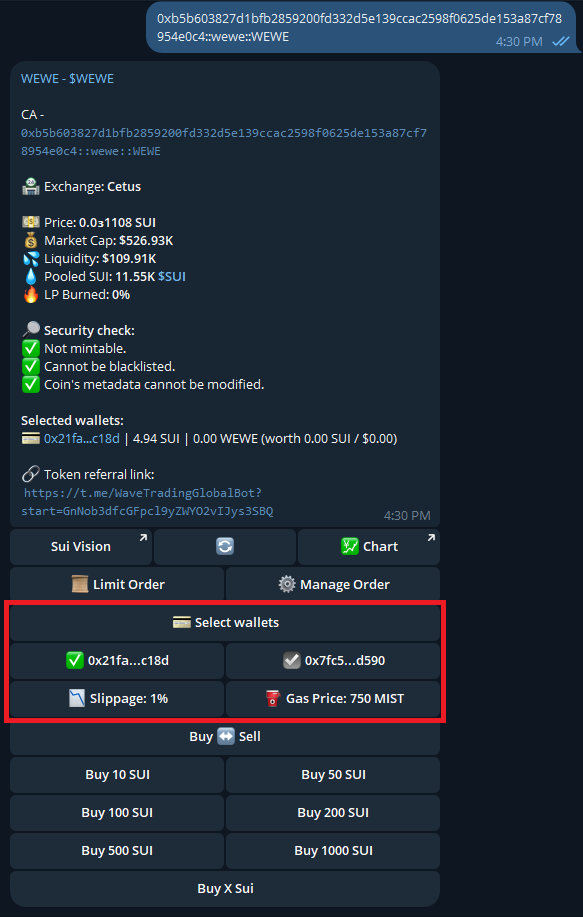
To begin trading, simply paste the contract address of the token you wish to trade. Wave Trading Bot will provide you with valuable information about the token, your current balance, and an interactive keyboard for buying or selling the token.&#x20;

<figure><img src="https://1657324024-files.gitbook.io/~/files/v0/b/gitbook-x-prod.appspot.com/o/spaces%2FO0OuE9apMynE1w94XSMA%2Fuploads%2FP07fA5tQfTxvflcXd2RA%2FBuy%20Sell%20New%201.png?alt=media&amp;token=58e84914-85fa-48b3-a7ad-3fedb3b9f167" alt=""><figcaption></figcaption></figure>

To ensure you have the most up-to-date information, use the "🔄" button to refresh the data when needed.

### 1. Trading Keyboard

To start trading with Wave Trading Bot, follow these steps:&#x20;

* #### Paste a Contract Address: Enter the contract address of the token you want to trade. This will bring up the token information.&#x20;

* #### Choose Wallet(s):  Select the wallet(s) you want to use for the trade. If you only have one wallet, it will already be selected automatically.&#x20;

* #### Choose the Buy Amount: Press the button with desired SUI amount you want to buy. Keep in mind that all selected wallets will execute the purchase order.&#x20;

* #### Transaction Confirmation: The bot will prompt you with a transaction sent message. Once the transaction is confirmed, you will receive a confirmation message.&#x20;

<div><figure><img src="https://1657324024-files.gitbook.io/~/files/v0/b/gitbook-x-prod.appspot.com/o/spaces%2FO0OuE9apMynE1w94XSMA%2Fuploads%2F5xtlJNRcmdKirPzLCW1L%2FBuy%20Sell%20New%202.png?alt=media&amp;token=11da6f66-f30d-4830-909e-08d4eaec5618" alt=""><figcaption></figcaption></figure> <figure><img src="https://1657324024-files.gitbook.io/~/files/v0/b/gitbook-x-prod.appspot.com/o/spaces%2FO0OuE9apMynE1w94XSMA%2Fuploads%2FUAAcympSqeObwd9DzDFA%2FBuy%20Sell%20New%203.png?alt=media&amp;token=204c0276-ab57-4df7-8ba8-07bb632d080e" alt=""><figcaption></figcaption></figure></div>

If you want to sell:&#x20;

* Paste a Contract Address: Enter the contract address of the token you want to trade. This will bring up the token information.
* Choose Wallet(s): Select the wallet(s) you want to use for the trade. If you only have one wallet, it will already be selected automatically.&#x20;
* Switch between buying and selling:  Press the Buy↔ Sell button&#x20;
* Choose the Sell Amount: Press the button with desired percentage of SUI you want to sell. Keep in mind that all selected wallets will execute the purchase order.&#x20;
* Transaction Confirmation: The bot will prompt you with a transaction sent message. Once the transaction is confirmed, you will receive a confirmation message. &#x20;

<figure><img src="https://1657324024-files.gitbook.io/~/files/v0/b/gitbook-x-prod.appspot.com/o/spaces%2FO0OuE9apMynE1w94XSMA%2Fuploads%2FyJ3Ino9ZJIS10FLRP7p3%2FBuy%20Sell%20New%204.png?alt=media&amp;token=60d77ef2-4c00-4cb4-b057-307429bdec9a" alt=""><figcaption></figcaption></figure>

### ![](data:image/png;base64,iVBORw0KGgoAAAANSUhEUgAAAAcAAAAHCAYAAADEUlfTAAAAAXNSR0IArs4c6QAAAARnQU1BAACxjwv8YQUAAAAJcEhZcwAADsMAAA7DAcdvqGQAAAANSURBVBhXYxgugIEBAADLAAEPlx7UAAAAAElFTkSuQmCC) 2. Placing a Limit Order

Wave Trading Bot enables you to place buy and sell limit orders at specific prices for tokens. This feature streamlines your trading process by automating the execution of trades based on your predefined criteria.&#x20;

**What's the Purpose of Limit Orders?**&#x20;

* Save Time: No need to constantly reload charts and monitor price changes manually.&#x20;
* Automate Trades: Set your limit orders, and let the bot handle the rest.&#x20;

Simply place your limit orders with Wave Trading Bot and let it perform the magic for you!&#x20;

**How to Place a Limit Order**&#x20;

* Open the Limit Order Menu - Click on "Limit Order" on your trading keyboard to access the Limit Order menu for the selected token.

<figure><img src="https://1657324024-files.gitbook.io/~/files/v0/b/gitbook-x-prod.appspot.com/o/spaces%2FO0OuE9apMynE1w94XSMA%2Fuploads%2FTlVImkss1lEO0dfvf4Cz%2FLimit%20New%201.png?alt=media&amp;token=9046691c-2877-408a-b913-da363cb1edbf" alt=""><figcaption></figcaption></figure>

* Select Wallet(s) - Choose the wallet(s) you wish to use for the trade. Each selected wallet will execute the trade.

<figure><img src="https://1657324024-files.gitbook.io/~/files/v0/b/gitbook-x-prod.appspot.com/o/spaces%2FO0OuE9apMynE1w94XSMA%2Fuploads%2FlnHVgW5HgqpcSMrTb6Eu%2FLimit%202.png?alt=media&amp;token=d8617afa-c7f9-4c37-a830-61c3948367ae" alt=""><figcaption></figcaption></figure>

* Choose Buy or Sell -  Decide whether you want to buy or sell the token

<figure><img src="https://1657324024-files.gitbook.io/~/files/v0/b/gitbook-x-prod.appspot.com/o/spaces%2FO0OuE9apMynE1w94XSMA%2Fuploads%2Fza91WbZ9hsstMLSEbF5G%2FLimit%203.png?alt=media&amp;token=e1f9b763-1ea7-4b88-a74a-a6e8b24d0349" alt=""><figcaption></figcaption></figure>

* Set Price Trigger - Specify the price at which the buy/sell order should be triggered.&#x20;

<figure><img src="https://1657324024-files.gitbook.io/~/files/v0/b/gitbook-x-prod.appspot.com/o/spaces%2FO0OuE9apMynE1w94XSMA%2Fuploads%2FtK9Lr3GWfeUqBglJeWTa%2FLimit%204.png?alt=media&amp;token=8bcd2ec8-7624-4cc9-be05-f1b499793ed1" alt=""><figcaption></figcaption></figure>

* Enter Purchase Details

&#x20;             \- For buying, select the amount of SUI you want to purchase the token for.&#x20;

&#x20;             \- For selling, simply choose the percentage of your current token holdings you want to sell.

<figure><img src="https://1657324024-files.gitbook.io/~/files/v0/b/gitbook-x-prod.appspot.com/o/spaces%2FO0OuE9apMynE1w94XSMA%2Fuploads%2Fnh82glTudOU4elGd4NV6%2FLimit%205.png?alt=media&amp;token=624b8f42-1501-40c9-9a0f-6100105f6384" alt=""><figcaption></figcaption></figure>

### 3. Managing Active Positions

To view and manage Your Active Positions, follow these steps:&#x20;

* Go to the main menu and press `Positions` or use `/positions` command.&#x20;

<figure><img src="https://1657324024-files.gitbook.io/~/files/v0/b/gitbook-x-prod.appspot.com/o/spaces%2FO0OuE9apMynE1w94XSMA%2Fuploads%2FhB4GrVePeaPO1vkisXMQ%2FPosition%20New%201.png?alt=media&amp;token=6cf28936-3b6e-4ec4-8baf-a22ac5131cac" alt=""><figcaption></figcaption></figure>

* Select the wallet you want to display active positions for.&#x20;

<figure><img src="https://1657324024-files.gitbook.io/~/files/v0/b/gitbook-x-prod.appspot.com/o/spaces%2FO0OuE9apMynE1w94XSMA%2Fuploads%2FO0rhHvjxHVUu60hvFjO7%2FPositions.png?alt=media&amp;token=c1530775-64cc-42fb-812a-834429417cdf" alt=""><figcaption></figcaption></figure>

* In case you need to update the data, press the refresh (🔄) button.&#x20;

<figure><img src="https://1657324024-files.gitbook.io/~/files/v0/b/gitbook-x-prod.appspot.com/o/spaces%2FO0OuE9apMynE1w94XSMA%2Fuploads%2FIjRaVR8t5zOvwNtgAXFH%2FPositions%201.png?alt=media&amp;token=b01e0504-8bf6-49f1-8549-5b4a32c744c4" alt=""><figcaption></figcaption></figure>

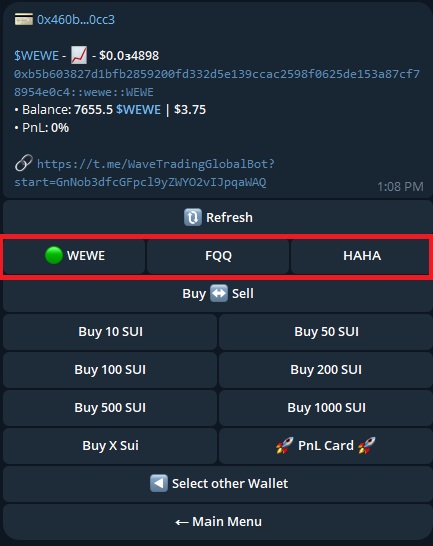
* Select the token you want to trade. You will see "✅" next to the current active token.&#x20;

<figure><img src="https://1657324024-files.gitbook.io/~/files/v0/b/gitbook-x-prod.appspot.com/o/spaces%2FO0OuE9apMynE1w94XSMA%2Fuploads%2FQu2krQAooOAuHJHdfxd7%2FPositions%203.png?alt=media&amp;token=a697c213-2242-4bc4-83fe-48fb8aa787e2" alt=""><figcaption></figcaption></figure>

* Use `Buy ↔ Sell` button to switch between buying and selling.&#x20;

<figure><img src="https://1657324024-files.gitbook.io/~/files/v0/b/gitbook-x-prod.appspot.com/o/spaces%2FO0OuE9apMynE1w94XSMA%2Fuploads%2FAt1EOUbp1sNUtmA73DsQ%2FPosition%204.png?alt=media&amp;token=91cf6b11-f592-4de3-bd29-0709ada2580d" alt=""><figcaption></figcaption></figure>

* To execute a trade, choose one of the trading buttons below. After the trade is confirmed, the bot will automatically update your positions menu to display accurate balance values.&#x20;

### 4. Generating PnL Cards for Your Active Positions

1. Press the `PnL Card` button to generate a card for the current active token.&#x20;
2. If you want to customize the card that the bot sends to you, you may use `Duration` and `Initial & Growth` buttons to show/hide the respective parameters.&#x20;
3. To regenerate the PnL card with updated configuration (`Duration` and `Initial & Current Gain`), press the `Regenerate` button.

<figure><img src="https://1657324024-files.gitbook.io/~/files/v0/b/gitbook-x-prod.appspot.com/o/spaces%2FO0OuE9apMynE1w94XSMA%2Fuploads%2FOGnVyHW8BtNiux6VtSTE%2FPNL%20Gen%201%20(1).png?alt=media&amp;token=2a3fbf63-559a-4408-88cb-a264d88b8772" alt=""><figcaption></figcaption></figure>


# Referral Program

This referral program offers up to 50% of platform fees earned from referrals across five levels. Here's how it works:&#x20;

**System Referrals:**&#x20;

* 10% platform fees for system referrals: Earn this by inviting users to join Wave Trading&#x20;
  * 8% platform fees for Level 1 referrals&#x20;
  * 2% platform fees for Level 2 referrals Token

**Token Referrals:**&#x20;

Receive 15% of platform fees when users trade a specific token you referred.&#x20;

Earn up to 25% additional fee share when your referrals reach the required trading volumes:&#x20;

* $100,000 Trading Volume: Receive an extra 5% fee share.
* $300,000 Trading Volume: Receive an extra 10% fee share.
* $500,000 Trading Volume: Receive an extra 25% fee share.

To set your withdrawal address for rewards, click the **`Set Withdrawn Wallet`** button and paste the wallet address to which you want to receive your rewards.

<figure><img src="https://1657324024-files.gitbook.io/~/files/v0/b/gitbook-x-prod.appspot.com/o/spaces%2FO0OuE9apMynE1w94XSMA%2Fuploads%2Fz3FEMXlmQPxhV3XqlYvp%2FReferrals%201.png?alt=media&amp;token=03e9dbb8-1e0f-4080-a33b-fa7bf2d49e91" alt=""><figcaption></figcaption></figure>


# Sniper Functions

### 1. Fun Platform Sniper&#x20;

Wave Sniper allows you to follow any dev wallet and snipe every token it launches with up to 40 wallets at once. &#x20;

To use it, follow these steps:&#x20;

* Press the platform snipe button for the token you want to snipe&#x20;
* Select `Add Dev Wallet`
* Enter the dev wallet address to configure new sniping settings&#x20;

<div><figure><img src="https://1657324024-files.gitbook.io/~/files/v0/b/gitbook-x-prod.appspot.com/o/spaces%2FO0OuE9apMynE1w94XSMA%2Fuploads%2Fhhy4Z7qg8lIPSC0h3oHV%2FSnipe%201.png?alt=media&amp;token=f6c3ca21-207c-4585-b58e-746d83ab06c9" alt=""><figcaption></figcaption></figure> <figure><img src="https://1657324024-files.gitbook.io/~/files/v0/b/gitbook-x-prod.appspot.com/o/spaces%2FO0OuE9apMynE1w94XSMA%2Fuploads%2FkOW41KSKDLaehpzJTBEr%2FSnipe%202.png?alt=media&amp;token=1ea24272-22eb-4755-a69b-a916e38f2a77" alt=""><figcaption></figcaption></figure> <figure><img src="https://1657324024-files.gitbook.io/~/files/v0/b/gitbook-x-prod.appspot.com/o/spaces%2FO0OuE9apMynE1w94XSMA%2Fuploads%2FhuLT0P6bRvKaP0jH00Cm%2FSnipe%203.png?alt=media&amp;token=51859de7-d219-40cc-8aa8-c679e844ceb1" alt=""><figcaption></figcaption></figure></div>

* Select your wallet(s) that you want to use for sniping
* Enter the amount SUI you want to snipe with&#x20;
* Then pressing the `Snipe` button to confirm the snipe order. Done!&#x20;
* If you want to select all of your wallets for sniping you can choose the `All Wallets` button &#x20;

<div><figure><img src="https://1657324024-files.gitbook.io/~/files/v0/b/gitbook-x-prod.appspot.com/o/spaces%2FO0OuE9apMynE1w94XSMA%2Fuploads%2FLV8u6RFsnKOkm9JOuaWF%2FSnipe%204.png?alt=media&amp;token=509d4029-9c57-4e8a-af69-963c61ff5eca" alt=""><figcaption></figcaption></figure> <figure><img src="https://1657324024-files.gitbook.io/~/files/v0/b/gitbook-x-prod.appspot.com/o/spaces%2FO0OuE9apMynE1w94XSMA%2Fuploads%2FiPwzQ6B0bstjbGvv24fQ%2FSnipe%205.png?alt=media&amp;token=e4309e29-3849-421d-bd7b-13a8d01e47c0" alt=""><figcaption></figcaption></figure></div>

### 2. Liquidity Sniper&#x20;

With Liquidity Sniper, you can add any token that doesn't have a liquidity pool yet and snipe it as soon as liquidity is added with up to 40 wallets at once.&#x20;

Liquidity Sniper works for DEXs on SUI, including Cetus, Turbos Finance, and BlueMove.&#x20;

To use Liquidity Sniper, follow these steps:&#x20;

* From the main menu, press `Liquidity Sniping`
* Press `Add Token`
* Enter the address of a token for new sniping configuration

<div><figure><img src="https://1657324024-files.gitbook.io/~/files/v0/b/gitbook-x-prod.appspot.com/o/spaces%2FO0OuE9apMynE1w94XSMA%2Fuploads%2FOZJXAdgx4vmuwDgzi4EJ%2FSnipe%206.png?alt=media&amp;token=67b5dc90-aa2e-48f3-b049-3aeedb50230f" alt=""><figcaption></figcaption></figure> <figure><img src="https://1657324024-files.gitbook.io/~/files/v0/b/gitbook-x-prod.appspot.com/o/spaces%2FO0OuE9apMynE1w94XSMA%2Fuploads%2FEEXavMuUBcdTiEGM2f7X%2FSnipe%207.png?alt=media&amp;token=46ddf361-c82d-4bca-a97c-935c3bf04fc4" alt=""><figcaption></figcaption></figure> <figure><img src="https://1657324024-files.gitbook.io/~/files/v0/b/gitbook-x-prod.appspot.com/o/spaces%2FO0OuE9apMynE1w94XSMA%2Fuploads%2Fi7O11grfkseJ5RZ149EJ%2FSnipe%208.png?alt=media&amp;token=062aaae0-574e-4ef1-9fcd-fc302e6fa5da" alt=""><figcaption></figcaption></figure></div>

If you want to select all of your wallets for Liquidity Sniping, follow the steps below:&#x20;

* From the Liquidity Sniping menu, press `All Wallets`
* Enter the amount of SUI you want to snipe with&#x20;
* Done! Wallets actively sniping will be highlighted in green.&#x20;


# Wave Legends: WOG NFT

&#x20;**“NFT Wave OG”** — a unique collection of NFTs, exclusively designed for early contributors who have made significant contributions to the development of Wave.&#x20;

Total Supply: 10,000 NFTs

\
Detail Information: <https://suivision.xyz/nft/collection/0xbe9d578ed9e0b7dbd79555fe02b8058be262f4c534adbf816cd6c4606df9ead9::ocean_nft::NFT><br>

<figure><img src="https://1657324024-files.gitbook.io/~/files/v0/b/gitbook-x-prod.appspot.com/o/spaces%2FO0OuE9apMynE1w94XSMA%2Fuploads%2FWMa3NLV1pt1rYSsSXxrH%2Fjjjjj%201.png?alt=media&amp;token=52ce634d-cf3d-4460-9fb4-f7abb6d6a16a" alt=""><figcaption><p>WOG is a collection of NFTs exclusively designed for users who have made significant contributions to the development of Wave. The collection consists of a total of 10,000 unique NFTs.</p></figcaption></figure>

### FAQ:

Q1: How many NFTs are there in total?&#x20;

A1: NFTs only hold value if they are truly scarce, so there are only 10,000 WOG-NFTs in existence.

Q2: How can I own NFTs?

A2: According to the project's roadmap, NFTs will be released alongside the release schedule of DApps. Users can still purchase NFTs using $OCEAN or $SUI. Users can transfer ownership of NFTs.

Q3: What are the benefits of owning NFTs?

A3:&#x20;

* Allows users to have advantages in using DApps at future milestones.
* Allows users the opportunity to participate in Airdrop events of Wave as well as projects collaborating with Wave within the Sui ecosystem.
* *Coming soon ...*

<br>

<br>


# Wave Legends: Season 1 (Ended)

&#x20;Wave Legends - Season 1

* Start: 5:00 am UTC -  9 May 2024
* End: 5:00 pm UTC - 12 May 2024
* Price: 200 $OCEAN
* Quantity: 200 - FCFS

<figure><img src="https://1657324024-files.gitbook.io/~/files/v0/b/gitbook-x-prod.appspot.com/o/spaces%2FO0OuE9apMynE1w94XSMA%2Fuploads%2FWMa3NLV1pt1rYSsSXxrH%2Fjjjjj%201.png?alt=media&amp;token=52ce634d-cf3d-4460-9fb4-f7abb6d6a16a" alt=""><figcaption><p>WOG is a collection of NFTs exclusively designed for users who have made significant contributions to the development of Wave. The collection consists of a total of 10,000 unique NFTs.</p></figcaption></figure>


# Wave Legends: Season 2 - SUI Round (Ended)

<figure><img src="https://1657324024-files.gitbook.io/~/files/v0/b/gitbook-x-prod.appspot.com/o/spaces%2FO0OuE9apMynE1w94XSMA%2Fuploads%2FWMa3NLV1pt1rYSsSXxrH%2Fjjjjj%201.png?alt=media&amp;token=52ce634d-cf3d-4460-9fb4-f7abb6d6a16a" alt=""><figcaption><p>WOG is a collection of NFTs exclusively designed for users who have made significant contributions to the development of Wave. The collection consists of a total of 10,000 unique NFTs.</p></figcaption></figure>

#### Wave Legends - Season 2 - SUI Round

Wave will launch an auction event for 500 WOG NFTs to celebrate the Wave community reaching the milestone of 500,000 members.

**How to participate:**

Join the auction by bidding with SUI. At the end of the event, the top 500 users with the **earliest** and **highest** bids will win the NFT.

* Start: 12 AM UTC, 15 May 2024
* End: 2 AM UTC, 29 May 2024
* Price ($SUI): By Community - Floor price: 135 $SUI
* Quantity: 500

NOTE:&#x20;

1/ In case of there are two participants bid the same amount, the one who bids earlier will be ranked higher. The bid time is determined by the time of the first bid transaction is created.

2/ All players who participated and failed in the auction will have their $SUI refunded after the event ended.

3/ Failed participants in the auction will receive a reward in $OCEAN. The higher your bid, the larger the reward.


# Wave Legends: Season 2 - OCEAN Round

<figure><img src="https://1657324024-files.gitbook.io/~/files/v0/b/gitbook-x-prod.appspot.com/o/spaces%2FO0OuE9apMynE1w94XSMA%2Fuploads%2FWMa3NLV1pt1rYSsSXxrH%2Fjjjjj%201.png?alt=media&amp;token=52ce634d-cf3d-4460-9fb4-f7abb6d6a16a" alt=""><figcaption><p>WOG is a collection of NFTs exclusively designed for users who have made significant contributions to the development of Wave. The collection consists of a total of 10,000 unique NFTs.</p></figcaption></figure>

#### Wave Legends - Season 2 - OCEAN Round

Wave will launch an event to distribute 300 WOG NFTs to the community to celebrate the Wave community reaching 500,000 members.

**How to participate:**

Join the [Lucky Wheel - WOG NFT](/product/gamefi/lucky-wheel/daily-wog-nft-wheel-ocean) event for a chance to own a WOG NFT.

* Start: 11 AM UTC, 2 Jun 2024&#x20;
* End: TBA
* Price ($OCEAN): By Community
* Quantity: 300


# Wave Genesis

The Wave Genesis NFT provides access to future Launchpad events on WavePad. It facilitates whitelisting and maximizes allocation for upcoming rounds.

<figure><img src="https://1657324024-files.gitbook.io/~/files/v0/b/gitbook-x-prod.appspot.com/o/spaces%2FO0OuE9apMynE1w94XSMA%2Fuploads%2FBUbolA8HykgV26tFGSgI%2FWAVEGENESISpng%402x.png?alt=media&amp;token=42cdd415-f8ff-4902-9748-2ce5f1a2f3ea" alt="" width="375"><figcaption></figcaption></figure>

**Total supply**: 3,456

Detail Information: <https://suivision.xyz/nft/collection/0xb32dc6b71d2c13bb220957d0664b20b9b822c1deb48c930e6d112de9303f946a::wave_genesis_nft::NFT>

Projects will take place in multiple rounds and limited by whitelist and maximum allocation. Owning a Wave Genesis allows you to participate in the whitelist without any additional conditions. The more NFTs you hold, the higher the maximum allocation you can receive.

**WOG = Wave Genesis + Exclusive Benefits**

**FAQ**

**Q1**: What happens if I have 1 WOG?\
**A1**: You will be whitelisted on WavePad and receive the maximum allocation for holding 1 NFT.

**Q2**: What happens if I have 1 WOG and 1 Wave Genesis?\
**A2**: You will be whitelisted and receive the maximum allocation for holding 2 NFTs.

**Q3**: Am I eligible to participate in the event if my WOG NFT is still being staked? \
**A3**: Yes, we will still be able to identify you as a WOG NFT Holder.


# WAV Token

<figure><img src="https://1657324024-files.gitbook.io/~/files/v0/b/gitbook-x-prod.appspot.com/o/spaces%2FO0OuE9apMynE1w94XSMA%2Fuploads%2FB7DqPN5qPTSaYIKJ4B1r%2Fimage.png?alt=media&amp;token=78348b16-d752-4562-b196-38c4f03edfbe" alt=""><figcaption></figcaption></figure>

**Name: Wave Token**

**Ticker:** $WAV

**Chain:** Sui

**Contract Address**: 0x82616322719cb327186d5b83a6d7783ce5cef4c5dbd4c6d1b5f3d6e5d288e2be::wav::WAV

**Initial Supply:** 90,000,000 WAV

**Total Supply (Max):** 1,000,000,000 WAV

WAV is the native token of Wave Ecosystem

## Token Utility

**Payment method**: The primary currency for transactions in Wave’s dApps, games, DeFi and Wave Trading products.&#x20;

**Commission fees**: Third-party dApps and games integrated into Wave must pay fees using $WAV.

**DeFi Profits & Staking**: $WAV holders can earn interest and staking rewards through Wave’s DeFi products.&#x20;

**Exclusive Access to Meme Tokens**: Through WavePad and WaveStaking, $WAV holders will get early access to meme token presales and launches.

**Buyback & Burning Mechanism**: Wave will use platform profits to buy back and burn $WAV tokens, ensuring long-term value and reducing inflation.

## Token Allocation

<table><thead><tr><th width="72.83984375">#</th><th>Category</th><th>Allocation (%)</th></tr></thead><tbody><tr><td>0</td><td>Seed Round</td><td>10</td></tr><tr><td>1</td><td>Private Round</td><td>12</td></tr><tr><td>2</td><td>Public Round</td><td>1.5</td></tr><tr><td>3</td><td>Liquidity</td><td>4</td></tr><tr><td>4</td><td>Ecosystem</td><td>30</td></tr><tr><td>5</td><td>Airdrop Season 1</td><td>10</td></tr><tr><td>6</td><td>Community</td><td>15</td></tr><tr><td>7</td><td>Advisors &#x26; Early Contributors</td><td>8</td></tr><tr><td>8</td><td>Team</td><td>9.5</td></tr></tbody></table>

<figure><img src="https://1657324024-files.gitbook.io/~/files/v0/b/gitbook-x-prod.appspot.com/o/spaces%2FO0OuE9apMynE1w94XSMA%2Fuploads%2FGn6V9LJvh63MWYlxCXRs%2Fimage.png?alt=media&amp;token=b64180ea-1c24-4d3d-b1fc-578790c1dee3" alt=""><figcaption><p>$WAV Allocation</p></figcaption></figure>

## Token Vesting

<table><thead><tr><th width="70.6640625">#</th><th width="278.0859375">Category</th><th>Vesting Schedule</th></tr></thead><tbody><tr><td>0</td><td>Seed Round</td><td>10% released at TGE, 3 months cliff then linear vesting over the next 12 months</td></tr><tr><td>1</td><td>Private Round</td><td>10% released at TGE, 3 months cliff then linear vesting over the next 9 months</td></tr><tr><td>2</td><td>Public Round</td><td>20% released at TGE, 2 months cliff then linear vesting over the next 4 months</td></tr><tr><td>3</td><td>Liquidity</td><td>100% released at TGE</td></tr><tr><td>4</td><td>Ecosystem</td><td>Linear vesting over the next 60 months</td></tr><tr><td>5</td><td>Airdrop Season 1</td><td>20% released at TGE, then linear vesting over the next 4 months</td></tr><tr><td>6</td><td>Community</td><td>5 months locked, then linear vesting over the next 55 months</td></tr><tr><td>7</td><td>Advisors + Early Contributors</td><td>1 year fully locked, then unlock over 24 months</td></tr><tr><td>8</td><td>Team</td><td>1 year fully locked, then unlock over 48 months</td></tr></tbody></table>

Here is a visualization of the supply and vesting for $WAV.

<figure><img src="https://1657324024-files.gitbook.io/~/files/v0/b/gitbook-x-prod.appspot.com/o/spaces%2FO0OuE9apMynE1w94XSMA%2Fuploads%2FXr4LvVVyL0qJFIyblFMT%2Fimage.png?alt=media&amp;token=3c97b2fa-b4d6-46a0-b56d-725206e8a446" alt=""><figcaption><p>$WAV Vesting Schedule</p></figcaption></figure>


# WEWE Token

<figure><img src="https://1657324024-files.gitbook.io/~/files/v0/b/gitbook-x-prod.appspot.com/o/spaces%2FO0OuE9apMynE1w94XSMA%2Fuploads%2FhUjUnq9OImhoiNeLoUkp%2Fwewebanner_claim%20wewe.png?alt=media&amp;token=b1be94fa-b612-4539-8bab-be629d959d52" alt=""><figcaption></figcaption></figure>

$WEWE is a meme coin created by the Wave Trading community. We aim for $WEWE to ignite a fresh meme culture where both the community and developers contribute equally.&#x20;

Revenue from platform fees, social activities, and bonuses from the Wave team will be used to add liquidity to $WEWE. The launch will be completely fair.

**Contract Address:** 0xb5b603827d1bfb2859200fd332d5e139ccac2598f0625de153a87cf78954e0c4::wewe::WEWE

**Symbol**: WEWE

**Total Supply**: 1,000,000,000 WEWE

**Tokenomics:**\
🔹 Community: 80% (100% unlocked at TGE)\
🔹 Liquidity: 20%


# OCEAN Token

Ocean Token ($OCEAN) lies at the core of Wave, designed to onboard and educate users into the ecosystem, as outlined in our key strategy. Users engage by playing games, earning OCEAN tokens, and using them across various events, games, and dApps available on Wave. Users are encouraged to explore these dApps with OCEAN tokens, which can be used to earn rewards such as SUI, NFTs, and Wave Points—key criteria for earning Wave's native token.

Holding tokens is essential for accessing dApps, particularly for users transitioning from Web2 to Web3. In many projects across various blockchains, acquiring tokens and covering gas fees to participate in dApps or receive airdrops can be costly. The Wave team aims to mitigate these costs while building a strong user base for dApps within the Wave ecosystem.


# Media Kit

## Wave Logos with Text

<figure><img src="https://1657324024-files.gitbook.io/~/files/v0/b/gitbook-x-prod.appspot.com/o/spaces%2FO0OuE9apMynE1w94XSMA%2Fuploads%2FHdfbJ6FAbRd1CDsNwTye%2Fwave-horizontal-original.png?alt=media&amp;token=852a4ed1-ac92-4af2-b8ce-d0b7b5199d37" alt=""><figcaption><p>Wave Original</p></figcaption></figure>

<figure><img src="https://1657324024-files.gitbook.io/~/files/v0/b/gitbook-x-prod.appspot.com/o/spaces%2FO0OuE9apMynE1w94XSMA%2Fuploads%2F8V37w9F2mXuTpNe4VSQ5%2Fwave-horizontal-black.png?alt=media&amp;token=6bccf95a-191c-4934-aa3c-9bbf94381a8c" alt=""><figcaption><p>Wave Black Font</p></figcaption></figure>

<figure><img src="https://1657324024-files.gitbook.io/~/files/v0/b/gitbook-x-prod.appspot.com/o/spaces%2FO0OuE9apMynE1w94XSMA%2Fuploads%2FEbg1cOy10dSCkgn2UGeX%2Fwave-horizontal-white.png?alt=media&amp;token=3337983d-12d0-43d4-84e6-b538b151b209" alt=""><figcaption><p>Wave White Font</p></figcaption></figure>

## Wave Round Logo

<figure><img src="https://1657324024-files.gitbook.io/~/files/v0/b/gitbook-x-prod.appspot.com/o/spaces%2FO0OuE9apMynE1w94XSMA%2Fuploads%2FWnRbbymv0mUsISSVC3j3%2FWAVE.png?alt=media&amp;token=dc5bdd37-9ebd-4f63-814b-8ede03628ae9" alt="" width="375"><figcaption><p>Wave Original Logo</p></figcaption></figure>

## Wave Theme Colors

<figure><img src="https://1657324024-files.gitbook.io/~/files/v0/b/gitbook-x-prod.appspot.com/o/spaces%2FO0OuE9apMynE1w94XSMA%2Fuploads%2Faf7RymzniNWNKrifcwAW%2FFrame%2048095794.png?alt=media&amp;token=0bc47ff6-99c9-4956-b42b-06e3043d03af" alt=""><figcaption><p>Wave Theme Colors</p></figcaption></figure>

## **More Wave Logos in png/svg**

<https://drive.google.com/drive/folders/17LGHj1HbDN9bHTjTb-ulUi7oWJEO6i3r?usp=sharing>


# Claim WAV Airdrop

**TGE**: 10 AM UTC, 31 March, 2025

* **Eligible airdrop users with a verified KuCoin UID:** You will receive your first distribution of 20% $WAV in your [KuCoin account](https://www.kucoin.com/r/af/r8TQL9B) before 10 AM UTC on March 31, 2025, and you can trade immediately at the listing time.
* **Eligible airdrop users without a KuCoin UID:** You will receive your first distribution of 20% $WAV on the Wave Mini App at 10:15 AM UTC on March 31, 2025.
* **Users with successful appeals**: You’ll receive your first 20% $WAV distribution on the Wave Mini App at 10:15 AM UTC on March 31, 2025.

The remaining 80% will be distributed over the next four months.


# Claim WAV Pre-Sale

**TGE**: 10 AM UTC, 31 March, 2025

Users can start claiming $WAV Pre-Sale Allocation on Wave Dashboard at **10:15 AM UTC on March 31, 2025.**

Follow these steps to claim your $WAV Pre-sale Allocation on Wave Dashboard:

#### 1. Access Dashboard

Go to [Dashboard](https://dashboard.waveonsui.com/)

<figure><img src="https://1657324024-files.gitbook.io/~/files/v0/b/gitbook-x-prod.appspot.com/o/spaces%2FO0OuE9apMynE1w94XSMA%2Fuploads%2FpxGK5Y5dCW73hCr7n5Vd%2FScreenshot%202025-03-26%20at%2013.24.35.png?alt=media&amp;token=d0ee0430-ccf9-4949-9c63-6affb3679483" alt=""><figcaption></figcaption></figure>

#### **2. Connect Your Sui Wallet:**

<figure><img src="https://1657324024-files.gitbook.io/~/files/v0/b/gitbook-x-prod.appspot.com/o/spaces%2FO0OuE9apMynE1w94XSMA%2Fuploads%2FCek4vS4Hg2AFcTe9c51n%2FScreenshot%202025-03-26%20at%2014.12.26.png?alt=media&amp;token=1bdb80ee-bbf5-4561-a4d3-d4ff0e69a6c5" alt=""><figcaption></figcaption></figure>

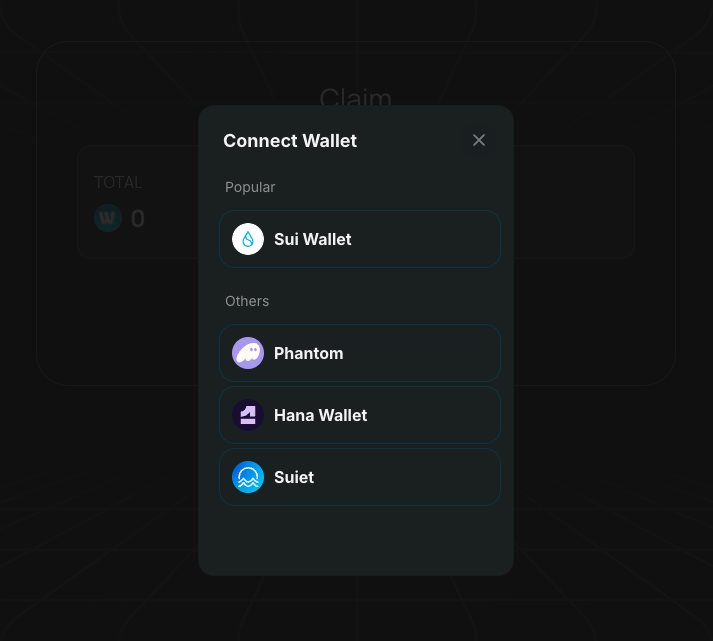
* Click on **Connect Wallet** and choose **Sui Wallet** that imported your Wave Wallet seed phrase.
* If you don’t have Sui Wallet installed, you can download it from this link: [Install Sui Wallet](https://chromewebstore.google.com/detail/sui-wallet/opcgpfmipidbgpenhmajoajpbobppdil)

#### **3. Sign to Verify:**

* After connecting, sign the request to verify your wallet address.

#### **4. Navigate to the Claim Page:**

* Once verified, head to the **"Claim"** page.

#### **5. Check Eligibility:**

If you’re eligible, the **Public & Private** tab will appear.

<figure><img src="https://1657324024-files.gitbook.io/~/files/v0/b/gitbook-x-prod.appspot.com/o/spaces%2FO0OuE9apMynE1w94XSMA%2Fuploads%2F0aq1ftjKSegWZ6Jsz7bH%2FScreenshot%202025-03-27%20at%2014.13.31.png?alt=media&amp;token=20a4fce3-a4ee-4f43-b163-b094b7b9c9d3" alt=""><figcaption></figcaption></figure>

**Understand Your Allocation:**

* **TOTAL**: This shows your total $WAV allocation.
* **CLAIMED**: This shows how much $WAV you have already claimed.

**Vesting Schedule:**

* The vesting schedule consists of rows, each representing a claimable period.
* The remaining amount will be unlocked following the [Vesting Schedule](https://docs.waveonsui.com/token/wav-token#token-vesting) for each round.

#### **6. Claiming Your $WAV:**

* When a claim is available, click the **"Claim"** button.
* Sign the transaction to complete the claim process.

#### **7. Transfer to CEX:**

After claiming, you can transfer your $WAV to one of the available centralized exchanges (CEX):

* **KuCoin**: [Register Here](https://www.kucoin.com/r/af/r8TQL9B)
* **MEXC**: [Register Here](https://promote.mexc.com/a/5q096t9z)
* **TBA**

**Note:** Ensure you double-check the CEX deposit address before transferring to avoid loss of funds.

Enjoy your $WAV and happy trading!